How to Move a WordPress Site to Webflow, Step by Step

Adrian KuleszoCo-founderUpdated
Table of contents
- What Moves, and How
- Step 1: Audit What the Old Site Has Earned
- Step 2: Build the Design System, Then the Templates
- Step 3: Recreate Each Post Type as a Collection
- Step 4: Export, Clean and Import the Content
- Step 5: Build the 301 Map and Import It
- Step 6: Carry Over On-Page SEO and Technical Setup
- Step 7: Launch, Then Watch for Four Weeks
- Timeline and Cost
- What a Webflow Build Like This Looks Like
- When Not to Move to Webflow
- FAQs
Moving WordPress to Webflow is a rebuild plus two CSV imports. You build the design system and page templates in Webflow, recreate each WordPress post type as a Webflow Collection, import the content as CSV (up to 4MB per file), then import your redirects as a second CSV under Site settings and publish. A typical SaaS marketing site takes six to eight weeks.
The steps are well known. What catches teams out are the WordPress details that don’t survive the trip: the export doesn’t contain your media files, images imported by URL don’t get responsive versions, file fields don’t import at all, and a redirect import wipes the redirects you already had. This guide is the process we use, with those details in the place you’ll meet them, each checked against Webflow’s and WordPress’s own documentation.
If you’d rather hand the move over, our WordPress to Webflow migration service runs this process for you. If you haven’t settled on Webflow yet, start with why teams are moving away from WordPress, which maps teams to Webflow, Framer or headless.
What Moves, and How
Here’s the whole map in one table: each part of a WordPress site, where it lands in Webflow, how it gets there and what to watch for.
| On WordPress | In Webflow | How it moves | Watch for |
|---|---|---|---|
| Posts | Items in a Posts Collection | CSV import, up to 4MB per file | Rich text comes in as HTML, and Webflow may strip elements, classes and attributes it doesn’t support |
| Pages built in Gutenberg or a page builder | Static pages built from your components | Rebuilt by hand | No importer for layouts; this is most of the build time |
| Custom post types and ACF fields | One Collection per type, with typed fields | A CSV per type | Number fields reject values like “$100” or “10,000”; option fields take up to 100 options |
| Categories and tags | Their own Collections, linked by reference fields | Names or slugs in the CSV, separated by semicolons for multi-reference | Items with custom slugs only match if the CSV uses that slug |
| Featured and inline images | Image fields and rich text images | Direct image URLs in the CSV | Imported images get no responsive variants (srcset), so upload key images in Webflow |
| PDFs and other media | Uploaded assets | By hand | File fields don’t import, and the WordPress export doesn’t contain the files themselves |
| SEO titles and descriptions (Yoast, Rank Math) | SEO fields bound to Collection fields | Extra CSV columns | Static pages need their meta set page by page |
| Redirects (a redirect plugin or server rules) | 301 redirects in Site settings | A two-column CSV, up to 16MB | An import replaces every existing redirect |
Step 1: Audit What the Old Site Has Earned
Before a screen is designed, list what the current site is worth, because that’s the thing a migration can lose.
- Crawl every URL with Screaming Frog or Ahrefs Site Audit: pages, posts, category and tag archives, author pages, PDFs. For a first pass, our free migration planner reads your sitemap and marks which URLs keep their path on Webflow and which need a 301.
- Export top pages by clicks and rankings from Search Console. That’s your protection list.
- Pull backlinks by URL. A page with twenty referring domains keeps that authority only if its URL survives or redirects cleanly.
- Record on-page SEO for every important page: title, description, H1 and schema.
- Take a baseline of traffic and positions the week before launch, so you know what “before” looked like.
Don’t trust the sitemap alone. When we moved our own site off Framer, the sitemap was missing a page our own navigation linked to, and the redirect map ended up with 116 rows for 63 live URLs once old redirects, hidden pages and short links were counted.
Step 2: Build the Design System, Then the Templates
Build the foundation first (type scale, colour variables, spacing, reusable sections), then assemble pages from it. A page-by-page port of the old theme carries the old problems across; a system is what lets marketing ship a new landing page long after launch without a developer.
Step 3: Recreate Each Post Type as a Collection
Create the Collections and their fields before importing anything: author, category, publish date, featured image, SEO title, SEO description, plus whatever your ACF fields hold. Webflow can create fields during an import, but deciding them up front is what stops ten near-identical fields from appearing.
Two WordPress habits need a decision here. Taxonomies become their own Collections, linked by reference fields, so a category renamed once updates everywhere. And only keep tag and category archives that already earn search traffic; redirect the rest to the closest useful page.
Step 4: Export, Clean and Import the Content
WordPress exports content as WXR (Tools, Export). That file holds your posts, terms, authors and the records of your attachments, but not the media files themselves, so plan the images separately. Convert the export to one CSV per Collection, then import it into Webflow:
- Keep each file under 4MB. Split a large blog into batches.
- Images come in by URL. Each image field takes a direct link to the file. Images imported this way don’t get responsive variants, so upload the images that matter (heroes, featured images on top posts) in Webflow directly.
- References match by name or slug. “Product Updates” in the CSV becomes product-updates and matches that category; an item with a custom slug only matches if the CSV uses the slug.
- Files don’t import. Upload PDFs and downloads by hand, then link them.
- Back up first. Webflow offers a pre-import backup; on a large site, take one yourself before you start.
Use the move to clean up: retire thin posts, merge near-duplicates, refresh what’s out of date. You won’t get a cheaper moment to do it.
Step 5: Build the 301 Map and Import It
Webflow CMS items live at a Collection folder plus one slug (/blog/my-post), and Webflow slugs only use a to z, 0 to 9 and hyphens. So date-based WordPress URLs (/2024/05/my-post/), nested categories and trailing slashes usually change. For every old URL, decide: same path, a 301 to its new address, or a 301 to the closest surviving page. Never send dead pages to the homepage; Google treats that like a missing page.
One URL, two outcomes
/blog/your-best-post/ becomes /posts/your-best-post
Without a redirect
Links to the old URL hit a 404
With a 301
Forwards to the new URL
And passes ranking authority
Then import the map: a two-column CSV (old path, new path) under Site settings, Publishing, 301 redirects. Three things from Webflow’s documentation that matter on launch day:
- An import replaces every existing redirect. Export the current list first and add to it.
- One invalid row fails the whole import. Webflow emails you the file with the errors marked.
- Redirects only work after you publish.
Webflow has no hard cap on redirects but recommends staying around 1,000, so when a whole group moves the same way, use one pattern rule instead of hundreds of lines. Our guide on how to build a 301 redirect map has the method and a template.
Step 6: Carry Over On-Page SEO and Technical Setup
- Titles, descriptions and headings from your audit, page by page and bound to Collection fields for posts
- Alt text on every image, and structured data through custom code where you used it
- Canonicals, a robots.txt that doesn’t block the new site, and a fresh sitemap
- The domain verified in Search Console before launch
- Page speed checked on staging against the old site
Step 7: Launch, Then Watch for Four Weeks
QA everything on staging first: every internal link, every form, every redirect. Launch early in the week so someone is around to fix problems, submit the sitemap and request indexing for key pages. For the next two to four weeks, watch Search Console for 404s and crawl errors, compare traffic and positions with your baseline daily, and re-crawl the live site for redirect chains.
Google’s guidance for site moves says visibility may fluctuate for a while during the move, and to keep redirects in place “generally at least 1 year”. A dip that doesn’t recover within a few weeks usually means a redirect gap, so that’s the first place to look.
The move, in order
Audit
URLs, traffic, backlinks and on-page SEO.
System
Design system and templates in Webflow.
Collections
One per post type, fields first.
Content
CSV imports under 4MB, images and files handled.
Redirects
One CSV, exported first, then publish.
Launch
Early in the week, then four weeks of checks.
Timeline and Cost
A typical SaaS marketing site (homepage, product and feature pages, pricing, a few solution pages and a blog) takes six to eight weeks to move properly. Hundreds of posts, gated content or complex functionality take longer. Anyone promising a clean move of a substantial site in a week is cutting the audit or the redirects.
Price it as a rebuild, not a content transfer. Our website projects start at $15,000 for a full site; how much a WordPress migration costs has the market rates by route and the line items a quote must name.
What a Webflow Build Like This Looks Like
Here’s an honest note: none of our published case studies is a WordPress to Webflow move, so I won’t present one as if it were. What we can show is the destination: ParkBee, a 16-page B2B site in English and Dutch that we took from moodboards to a live Webflow site in 11 weeks. Pages for each property type, partner and use case come from one set of shared sections, and the blog and partner pages run on the CMS, so ParkBee’s team publishes without us. We built it in a separate Webflow project while the last pages were still in review, then ParkBee published it in June 2026. That’s the structure step 2 and step 3 are building towards.
11 weeks
from the first moodboard to the live site
ParkBee. 16 pages for owners, partners, use cases and pricing, in English and Dutch on one Webflow site.
Read the case study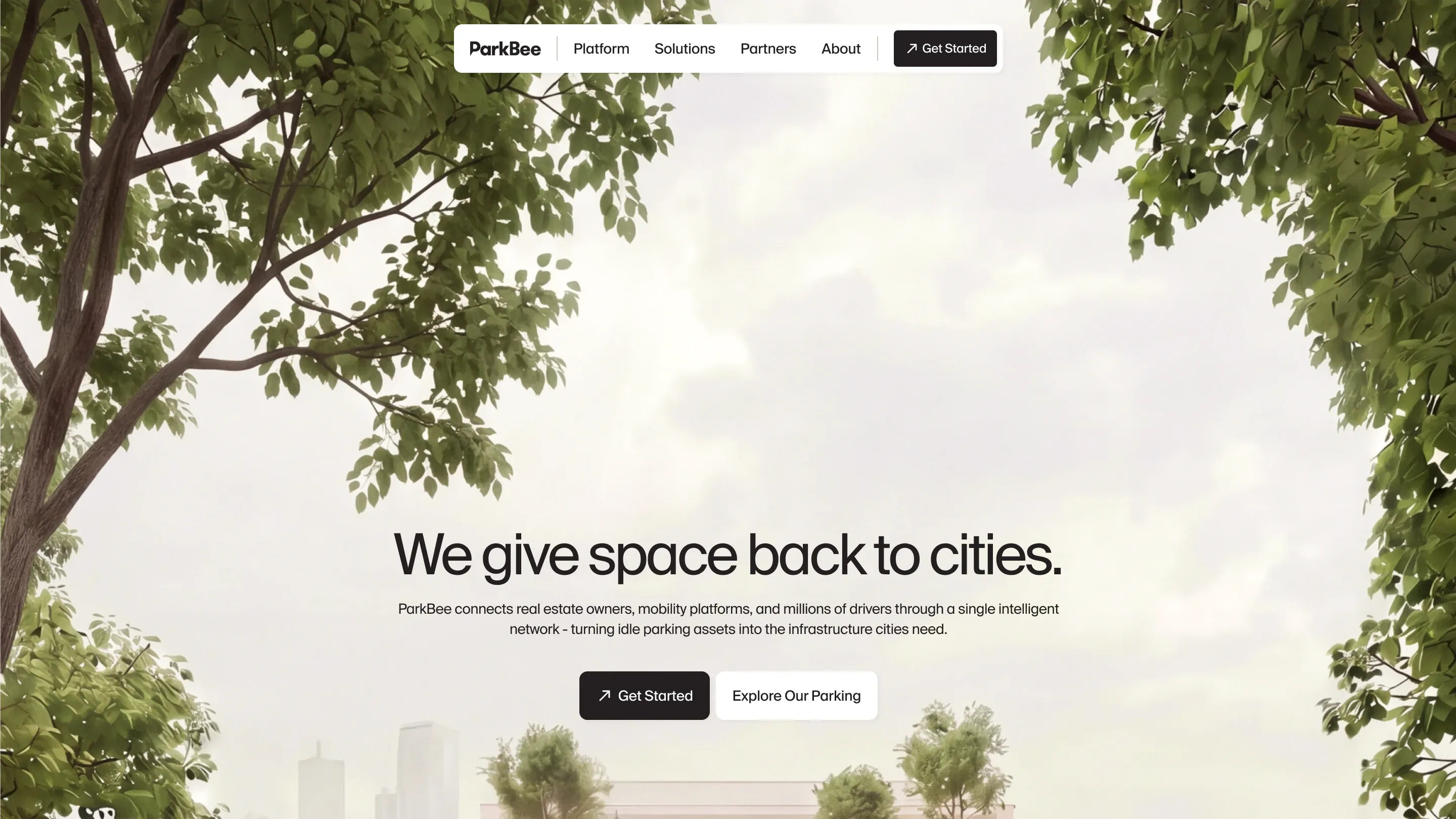
When Not to Move to Webflow
Stay on WordPress if WooCommerce or a membership plugin is the core of the business, if a large editorial team lives in wp-admin every day, or if you depend on a plugin with no equivalent. Webflow’s CMS is less flexible than WordPress for some advanced editorial setups. And if the site is a lean, design-led marketing site run by a small team, Framer may suit you better: how to move WordPress to Framer, step by step covers that route, and WordPress or Webflow for SaaS compares the platforms themselves.
DesignMe is a Webflow Premium Partner. We design and rebuild websites for funded B2B SaaS and AI companies, with SEO protection built in from the first audit. If you’re planning a move off WordPress, our intro call is 30 minutes and we’ll tell you honestly whether it’s worth doing:
Sources
- Webflow Help Center, How do I import content into the Webflow CMS? (CSV size, field types, images, references) (opens in a new tab)help.webflow.com
- Webflow Help Center, Import/export 301 redirects (CSV format, 16MB limit, imports overwrite, publish to apply) (opens in a new tab)help.webflow.com
- WP-CLI, wp export (what a WXR file does and doesn't include) (opens in a new tab)developer.wordpress.org
- Google Search Central, Site moves with URL changes (opens in a new tab)developers.google.com
Press Escape to close.
Want us to do it?WordPress to Webflow migration