How Much Does a WordPress Website Migration Cost?

Adrian KuleszoCo-founderUpdated
Table of contents
A WordPress migration done properly for a funded company is priced like a new website, because that’s what it is. At DesignMe a full site starts at $15,000 and a landing page at $10,000. On the open market, freelance web designers on Upwork charge a median of $15 to $30 an hour, and web design firms listed on Clutch around $100 to $149 an hour, with an average reviewed project of $38,105. The $500 quotes you’ll also see are real, and they’re pricing a different job: moving the content without protecting what it ranks for.
Below: the price by route with sources, what moves the number, the line items a proper quote must name, and what the site costs to run afterwards.
What It Costs, by Route
Two things to read into that table. The hourly numbers only mean something next to the hours: Upwork itself expects anything from 10 hours for a very small design project to several dozen for a large custom one, before revisions. And Clutch notes that most projects reviewed there cost under $10,000, so the average is pulled up by a smaller number of big builds.
Where we sit: we don’t do content transfers. In 2024 we raised our prices, and our average project value moved from around $8K to $14K. The work didn’t get more expensive to deliver; we stopped pricing it as a commodity, because the part that protects your traffic is the part a cheap quote cuts.
One word, two jobs
A migration quote
Content transfer
$500
Moves what is there
Fine for a tiny site with no traffic
- Move pages and posts(included)
- Point the domain(included)
- Design and rebuild(not included)
- 301 redirect map(not included)
- SEO preservation(not included)
- QA and monitoring(not included)
Rebuild
$40,000
Rebuilds and protects it
What a funded company almost always needs
- Move pages and posts(included)
- Point the domain(included)
- Design and rebuild(included)
- 301 redirect map(included)
- SEO preservation(included)
- QA and monitoring(included)
What Moves the Number
Six things explain almost the whole price. Use them to read any quote.
| Driver | Pushes the price up when | What to ask |
|---|---|---|
| Page count and content volume | Hundreds of posts, many templates, every URL to map | How many URLs and templates are in scope? |
| Redesign or straight port | You redesign while you move (most teams leaving WordPress do) | Which pages are redesigned and which are ported as they are? |
| Functionality | Memberships, gated content, CRM and automation integrations, calculators, several languages | Which plugins does each feature replace, and with what? |
| Content structure | Several content types, deep taxonomies, ACF fields to remap | How does each post type and custom field map to the new CMS? |
| SEO protection | Traffic and backlinks worth keeping | Is the redirect map a named deliverable? |
| Who does the work | Senior design, build and SEO in one team | Who owns the redirects and the launch week? |
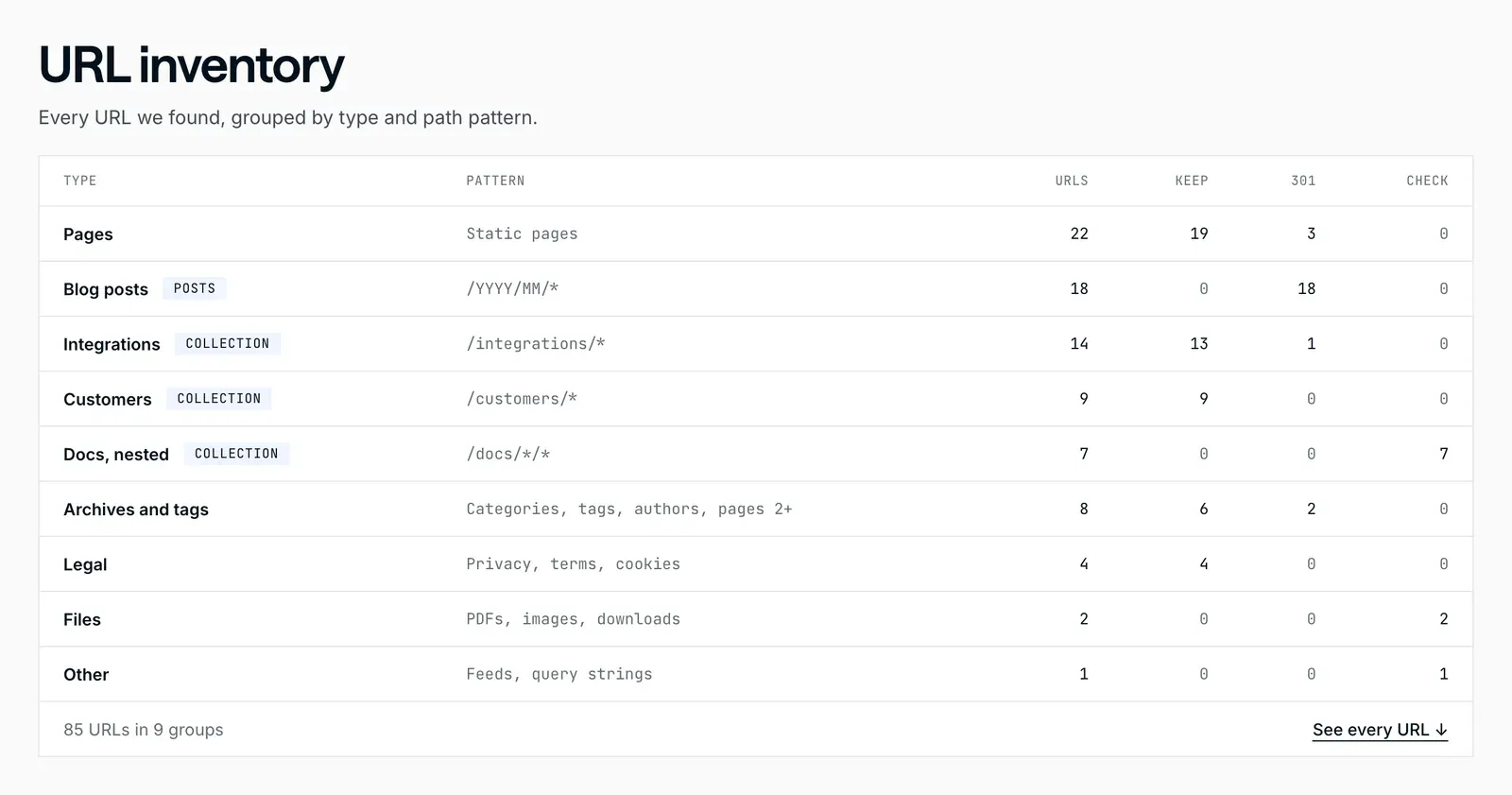
Most of these start from the URL list. Our free migration planner reads your sitemap, groups every URL by type and shows which keep their path and which need a 301, with a small, medium or large effort band.
What a Proper Quote Must Name
If a quote doesn’t list these as deliverables, it’s pricing a content transfer, however it’s worded.
| Deliverable | Why it matters | If it’s missing |
|---|---|---|
| URL audit with traffic and backlinks | Shows which pages carry rankings and links | Nobody knows what’s at risk until it’s gone |
| A complete 301 redirect map | Every changed URL forwards to its closest new page | Links and rankings hit 404s |
| On-page SEO carried over | Titles, descriptions, headings, alt text and schema survive | Years of on-page work are dropped |
| Staging QA | Forms, links and redirects checked before launch | Broken pages in front of real traffic |
| Post-launch monitoring | 404s, indexing and rankings watched daily for the first weeks | A slow leak nobody notices for a month |
Google’s own guidance for a site move with URL changes is to use permanent redirects (301 or 308), keep them “generally at least 1 year”, and expect search visibility to fluctuate for a while during the move. A quote that doesn’t plan for that year is missing part of the job. The redirect step has its own walkthrough: how to build a 301 redirect map.
Our Prices and Timelines
We price a WordPress migration as the website build it is, from the same published price list as any new site:
| Project | Price | Timeline |
|---|---|---|
| Landing page | From $10,000 | 2 to 3 weeks |
| Full marketing site in Framer, Webflow, Astro or Next.js | From $15,000 | 1 to 3 months |
| Coded site on a headless CMS | From $15,000 | 4+ weeks |
By destination, the typical SaaS marketing site with a blog takes six to eight weeks to move to Webflow and four to six weeks to Framer; large content libraries, gated content and complex functionality add time. Every one of those projects includes the audit, the redirect map, on-page SEO and the launch weeks, because a migration without them isn’t one. The full price list is on our pricing page, and each route has its own page: WordPress to Webflow, WordPress to Framer and WordPress to Astro.
What It Costs to Run Afterwards
The migration is a one-time cost; the platform is recurring, and small.
| Platform | Plan most marketing sites need | Billed annually | Seats |
|---|---|---|---|
| Webflow | Premium: 20,000 CMS items, 40 collections | $25 a month ($39 billed monthly) | Billed separately per workspace seat |
| Framer | Pro: 10 CMS collections | $30 a month ($45 billed monthly) | $20 per editor a month; free for a certified Framer expert on your project |
| Astro or Next.js | No platform plan; hosting from free for a mostly static site | Hosting only | No per-editor fees for the site itself |
A domain adds roughly $10 to $20 a year on any of them. Next to a one-time rebuild that decides how your site works for years, that’s a rounding error, so don’t let it drive the platform choice. The Webflow pricing guide and Framer pricing guide break the running costs down further.
The Expensive Migration Is the Cheap One
If organic search drives a real share of your pipeline, a migration that drops your rankings is a revenue event, not a line item. I’ve watched teams save a few thousand dollars on a budget move and then spend months, and far more than they saved, trying to win the traffic back.
So budget in this order:
- Scope honestly. URL count, redesign or port, functionality and content structure.
- Name the SEO deliverables. Audit, redirect map, on-page SEO, QA and monitoring, in writing.
- Add the platform plan. A few hundred dollars a year; don’t let it drive the decision.
- Weigh lost traffic against the saving. For most funded companies, doing it properly wins by a wide margin.
- Match the partner to the stakes. DIY or a freelancer for a low-stakes site, a senior team when traffic and brand are on the line.
Still choosing where to go? Why teams are moving away from WordPress maps teams to destinations, and how to migrate from WordPress without losing SEO covers the process behind the price.
DesignMe redesigns and migrates websites for funded B2B SaaS and AI companies, priced as the rebuilds they are, with SEO protection built in from the first audit. For a scoped number for your migration, our intro call is 30 minutes:
Sources
- Upwork, Web designer hourly rates and cost to hire (checked 20 October 2026) (opens in a new tab)upwork.com
- Clutch, Web design pricing guide (hourly rates and average project cost, updated 21 September 2026) (opens in a new tab)clutch.co
- Google Search Central, Site moves with URL changes (opens in a new tab)developers.google.com
- Webflow, Pricing (checked October 2026) (opens in a new tab)webflow.com
- Framer, Pricing (checked October 2026) (opens in a new tab)framer.com
Press Escape to close.
Want us to do it?Our website migration service