WordPress to Headless CMS Migration: When Sanity, Next.js, and Vercel Make Sense

Adrian KuleszoCo-founderUpdated
Table of contents
- What headless means
- When to stay on WordPress
- When to migrate
- Sanity, Next.js, Astro and Vercel
- Editing in Sanity Studio vs wp-admin
- How content modelling works
- How previews and publishing work
- What a migration involves
- What it costs and how long it takes
- What we did on our own move
- How we set up a headless build
- FAQs
Move WordPress to a headless CMS when your editors wait on developers for new layouts, plugin upkeep eats real hours every month, or the same content has to feed more than the website. Otherwise don’t: a small site, a WooCommerce store or a team happy in Gutenberg is better off where it is. If you do move, the lowest-risk first step is keeping wp-admin and rebuilding only the front end; a full move to Sanity adds a content migration on top. With us a headless build starts at $15,000 and takes 4 weeks or more.
Sanity, Next.js and Vercel get named together so often that they sound like one product. They’re three separate decisions: the CMS your editors open every day, the framework that turns content into pages, and the host that serves them. Below is what each layer means for the people who edit the site, how content modelling and previews work, what the move involves, and what we learned moving our own site into code in October 2026.
What headless means
In a headless setup the CMS stores content and serves it through an API, and a separate front end builds the pages visitors see. With WordPress that means editors keep working in wp-admin while a Next.js site fetches the content, or the content moves to a CMS like Sanity and WordPress goes away.
A classic WordPress site does all of this in one place: the database holds the content, the theme turns it into pages, plugins add forms, SEO fields and caching, and wp-admin is where everyone edits. A headless build pulls those jobs apart, so the editing tool, the code that builds pages and the servers that deliver them can each be picked (and replaced) on their own.
The headless stack, layer by layer
Editorswp-admin (WordPress stays the CMS) or Sanity Studio
APIServes the content
Front endNext.js or Astro
VercelHosts the pages visitors see
There are two ways to go headless from WordPress, and they carry very different amounts of work:
- Headless WordPress. WordPress stays as the CMS, editors keep wp-admin, and a new front end reads the content through the WordPress REST API. Nothing gets re-entered, and the cost is two systems to run: WordPress (with its updates) behind the scenes and the new site in front.
- A full move to Sanity. The content leaves WordPress for good and WordPress is switched off. You get a cleaner content model and better previews, and you pay for it with a real content migration and editor training.
When to stay on WordPress
Stay when the site is a few dozen pages and a plugin or two covers what you need, when WooCommerce sits at the centre of the business, when a large editing team is deeply used to Gutenberg, or when you depend on a plugin with no equivalent elsewhere. WordPress user management, multisite and membership tools take real effort to rebuild in a custom stack, and for these sites a caching plugin and good hosting are usually the cheaper fix.
Here’s the honest version: plenty of WordPress sites don’t need a new architecture, they need fewer plugins, a lighter theme and someone who owns updates. If that’s you, our WordPress redesign and migration checklist is a better next read than this one.
When to migrate
Four signals point toward headless.
The editing team waits on developers to publish new page layouts, or the content model is squeezed into posts and pages when it needs integrations, case studies and customers as separate linked types.
Plugin updates and security patches take real hours every month, and a bad update has broken the site before.
The same content has to reach a web app, a newsletter, docs or AI tools as well as the website. Structured content also helps with answer engines, which we cover in AEO for SaaS.
The front end has performance or design requirements that themes and page builders cannot meet.
If none of these apply, a rebuild in Webflow or Framer is usually the lighter move, and our WordPress or Webflow for SaaS post covers that path.
There’s a third answer that people forget when they frame this as “WordPress or headless”: a visual builder. If the real problem is that marketers can’t change a layout without a ticket, and nobody on the team wants to own a code repository, Webflow or Framer fixes that with a canvas instead of a CMS plus a codebase. We build in both, and we’ll say so when code isn’t needed. See how to choose between Webflow and Framer after WordPress.
| Signal | Points to | Why |
|---|---|---|
| A few dozen pages, and a plugin or two covers what you need | Stay on WordPress | Better hosting and caching are the cheaper fix |
| WooCommerce sits at the centre of the business | Stay on WordPress | The store and its plugins stay where they work |
| A large editing team deeply used to Gutenberg | Stay on WordPress | Editors keep the tool they know |
| You depend on a plugin with no equivalent elsewhere | Stay on WordPress | Rebuilding it is a project of its own |
| Editors wait on developers to publish new page layouts | Headless | Typed content and reusable sections |
| Plugin updates and security patches take real hours every month | Headless | No plugin layer on the public site |
| The same content has to reach a web app, newsletter, docs or AI tools | Headless | One source of structured content |
| Performance or design needs that themes and page builders can’t meet | Headless | The front end is yours to build |
| Marketers want to edit layouts on a visual canvas, and nobody wants to own code | Webflow or Framer | A canvas solves it without a codebase |
| A small, design-led marketing site that needs a refresh more than a rebuild | Webflow or Framer | Faster to launch, nothing to maintain |
| The site shares components or logins with a React product | Headless, on Next.js | Same stack as the product |
Sanity, Next.js, Astro and Vercel
Before the detail on each tool, here’s what each layer actually looks like from the marketing team’s side of the table. A common source of confusion is treating “Sanity, Next.js and Vercel” as one product, when your marketing lead will only ever open one of them.
| Layer | What it is | What marketing touches | Who looks after it |
|---|---|---|---|
| CMS (Sanity, or WordPress kept headless) | Where content is written and stored | Every day: pages, posts, case studies, images | Editors, with a developer for new content types |
| Framework (Next.js or Astro) | The code that turns content into pages | Never directly; they see it through previews | Developers or coding agents, through pull requests |
| Host (Vercel, Cloudflare or Netlify) | Builds the site and serves it worldwide | Preview links, and nothing else | Whoever owns the build: your engineers or the agency |
Sanity
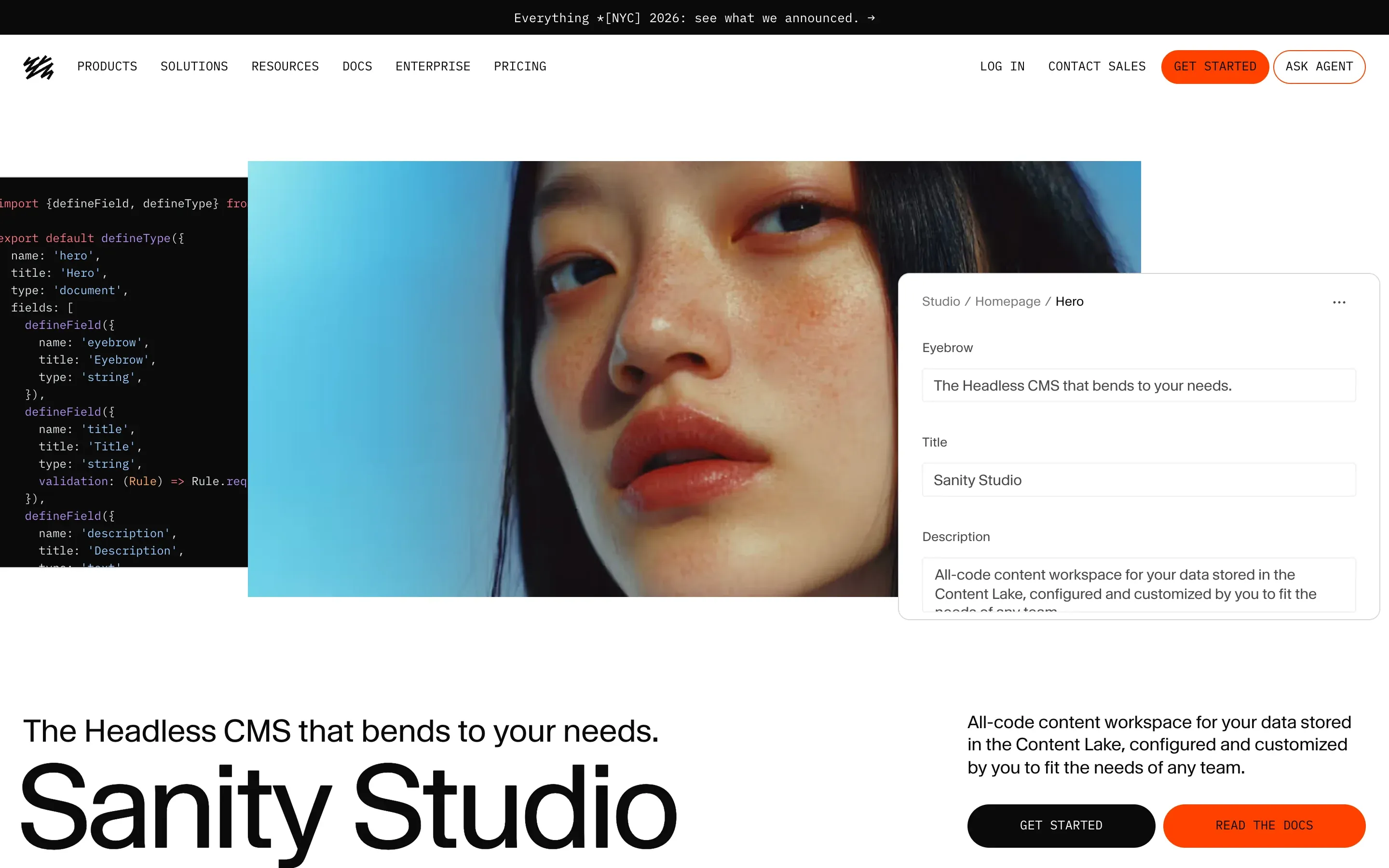
Sanity holds content as structured data that you define yourself. Case studies, integrations, pricing tiers and authors become their own types with their own fields, and editors can preview the page as they edit it. Rich text is stored as Portable Text, which converts cleanly to any front end, and the image pipeline handles crops and hotspots. Plan limits change, so check them before you budget.
The site queries that content with GROQ, Sanity’s query language, so the same case study can feed the website, the product and an email without being copied three times. Sanity also has an official MCP server, which lets AI agents query and patch documents with awareness of your schema. That matters more every month: a marketing lead can ask an agent to fix a product name across every case study, and the change still lands in the CMS where editors can see it.
Next.js
Next.js is the most common framework for headless front ends. It supports incremental static regeneration, so pages are served pre-built and refresh when content changes, and its large ecosystem means most integration problems already have an answer.
For a marketing team the practical upside is speed of publishing: a change in the CMS can appear on the live site without a full rebuild. The trade-off is that a server-rendered Next.js site has more server code to keep patched than a static one. We cover that, including the two 2025 security advisories that affected Next.js, in Next.js vs Astro for marketing websites.
Astro
Astro suits content-led marketing sites with little interactivity, since it ships very little JavaScript to the browser by default. Pick Astro when the site is mostly pages and the product app lives elsewhere, and pick Next.js when the site shares components or logic with a React app.
On a fully static Astro site, a publish in Sanity calls the host’s deploy hook and the site rebuilds, which usually takes a minute or two. Pages that must update the moment content changes can be rendered on the server, or use Astro’s live content collections, so you choose per page and the rest stays static. Astro is open source under the MIT license, and since January 2026 its core team works at Cloudflare, which has said Astro stays open source and works with any host.
Vercel
Vercel is the natural host for Next.js, with preview deployments on every branch, instant rollbacks and edge delivery built in. The Hobby plan is free and Pro is priced per seat, so check current pricing and count how many people need access.
One detail that catches companies out: Vercel’s Hobby plan is for personal, non-commercial use, so a company site belongs on Pro (listed at $20 a month per developer seat when we checked in October 2026) or on another host. Astro sites run just as well on Cloudflare Pages or Netlify, and that’s where ours lives.
The four layers, as their makers show them
Editing in Sanity Studio vs wp-admin
In wp-admin, a page is a long column of Gutenberg blocks or page-builder modules, often with shortcodes and inline styles mixed in. Editors have a lot of freedom, which is the appeal and the problem: two people building two landing pages will produce two different layouts, and custom fields added by Advanced Custom Fields or the theme sit in boxes below the editor where they’re easy to miss.
In Sanity Studio, editors fill in a form that matches the content type. A case study has fields for the client, the industry, the quote, the results and the hero image, and the page layout comes from the front end, so every case study looks right without anyone dragging blocks around. Studio can run on your own domain (for example at /admin), and with Visual Editing an editor can click a heading on the preview and land on the field behind it.
| Task | wp-admin | Sanity Studio |
|---|---|---|
| Write a blog post | Block editor, plus SEO plugin fields below | A post form with its own SEO fields |
| Add a case study | A page or custom post type, laid out by hand | A case study form; the layout comes from code |
| Reuse a customer quote | Copy and paste it onto each page | Reference one quote document from many pages |
| Crop an image for mobile | Fixed image sizes from the theme | Crop and hotspot once, used at every size |
| See the change before it goes live | WordPress Preview of the theme page | Preview of the real front end |
| New page layout | Page builder, or a developer ticket | A new section type built once by a developer |
| Updates to keep the editor running | Core, theme and plugin updates | Studio updates as code, no plugin layer |
The honest trade-off: Studio gives editors less freedom over layout and much more consistency. Teams that publish to a fixed set of page types (posts, case studies, integrations, landing pages from approved sections) usually get on well with it. Teams that want to design every page from scratch are happier on a visual builder.
How content modelling works
Content modelling is the step that decides whether a headless build is pleasant or painful, and it happens before any page is designed in code. You list every kind of thing the site talks about, give each one its own type with the fields it needs, and decide how the types link to each other.
For a typical B2B SaaS site coming off WordPress, the mapping usually looks like this:
| On WordPress | In Sanity | What changes for editors |
|---|---|---|
| Posts | A post type with author and category references | Same writing, cleaner fields |
| Custom post types (case studies, resources) | A type each, with only the fields it needs | No unused boxes on the screen |
| ACF and custom fields | Typed fields on the right type | Fields can’t drift between pages |
| Categories and tags | Reference fields to their own documents | Rename once, updates everywhere |
| Pages built in a page builder | Pages assembled from approved sections | Fewer layout choices, all on brand |
Two rules save most of the pain. First, model what the content is, not where it appears: a “customer” type that the homepage logo strip, the case study and the pricing page all reference, rather than three copies of the same logo. Second, only keep taxonomy archives that already earn search traffic, and redirect the rest (the WordPress to Astro migration page shows the same mapping for content kept in Markdown files instead of a CMS).
How previews and publishing work
Previews are what make a headless CMS usable for people who don’t read code, so we set them up as part of the build rather than as an extra. Here’s the path a change takes on a static Astro site with Sanity:
From Sanity Studio to the live page
Edit
The editor changes a field in Sanity Studio, on your own domain.
Preview
Visual Editing shows the real page with the draft, and a click on any text opens its field.
Publish
The editor presses publish in Studio.
Rebuild
A Sanity webhook calls the host’s deploy hook and the site rebuilds in a minute or two.
Live
The new page is served from the host, with the previous build kept for a rollback.
Changes to code (a new section type, a template, a navigation change) take a different path: they arrive as a pull request, the host builds a preview link for that branch, and someone approves it before it merges. Vercel builds a preview for every push to a non-production branch, Netlify builds a Deploy Preview for every pull request, and Cloudflare Pages gives every pull request its own preview URL. We wrote up that workflow, including how a marketing lead can ask Claude for a page and approve the preview, in how to let your team edit your website with Claude.
What a migration involves
Start with a URL inventory. Export every page, pull Search Console and backlink data by URL, and decide which URLs stay identical.
Model the content in Sanity next, so each WordPress post type and custom field has a destination type.
Then write an import script that reads the WordPress REST API, turns posts into Sanity documents and uploads the images, and test it on a copy before touching real content.
Rebuild the templates in Next.js or Astro, match the heading structure and metadata of the pages that rank, and set up previews for the editors.
Write a 301 redirect for every URL that changes and check that each one points to its closest new page, then compare speed against the old site before launch.
After launch, submit the new sitemap, watch 404s and indexing in Search Console, and track conversions for the first weeks.
Mind the host defaults when you write the redirects. On Vercel, a redirect marked permanent sends a 308, which Google treats the same as a 301. Cloudflare Pages sends a 302 when a line in its _redirects file has no status code, so write 301 on every line. On a static Astro build, redirects in the Astro config become HTML pages with a meta refresh, so we put them in the host’s file instead. Our redirect map guide has the full method and a template.
Here’s how those steps usually land on the calendar for a headless build with us:
A headless build, week by week
- Week 1
Scope and stack: the site, content, integrations and who edits what, and the CMS choice.
- Week 1-2
Content model: sections, collections, references and SEO fields in Sanity.
- Week 2-3
Design system in code: tokens, layouts and sections in Astro or Next.js.
- Week 3-4
Pages and CMS: templates, content wired in, forms and analytics, preview and publish hooks.
- Week 4+
Launch: SEO parity, redirects and a speed pass, then deploy with docs for your team and agents.
What it costs and how long it takes
The main cost is developer time, and it scales with three things: how many pages and templates the site has, how complex the content model is, and how many editors need training. Hosting and CMS fees are small next to that for most marketing sites.
- Build time. A headless build with us usually takes 4 weeks or more, from content model to launch. A site with many post types, years of posts to import or several languages sits at the longer end.
- Hosting. A mostly static Astro site costs little or nothing per month to host on Cloudflare, Netlify or Vercel, with no per-seat editor fees for the site itself. A Next.js site on Vercel needs a paid plan for a company (see the Vercel note above).
- CMS. Sanity has its own plans, priced by your team and usage, so price it for the number of people who’ll edit.
- WordPress during the move. If you go headless with WordPress kept as the CMS, its hosting and plugin upkeep stay on the bill. If you move to Sanity, WordPress stays up only until the redirects check out.
For a fuller breakdown by migration route, see how much a WordPress website migration costs, and our pricing page has the current ranges.
What we did on our own move
Our own site wasn’t on WordPress: designme.agency ran on Framer for three years and moved to Astro in October 2026. It’s still the closest thing we have to a first-hand headless story, because the hard parts were the same ones a WordPress team faces: finding every URL, getting content out of a platform that didn’t want to give it up, and deciding who edits what afterwards.
Here’s what the stack looks like now, because it’s slightly different from the one in this article’s title. The site is Astro, hosted on Cloudflare Pages, not Vercel. There’s no CMS on top: insights are Markdown files in a content collection with a schema, and service, comparison and migration pages are typed data files. The redirects live in a _redirects file at the host, generated from our redirect map, and a bad deploy can be rolled back instantly from the Cloudflare dashboard. The move took six days from the first commit to the DNS switch. Our Framer plan cost about $150 a month with 5 editors; the Astro site runs on Cloudflare’s free tier, so hosting is $0 a month.
- 63
- live URLs inventoried, every one kept
- 116
- rows in the redirect map
- 10.33MB → 0.52MB
- homepage page weight, Framer to Astro
A few things from that move carry straight over to a WordPress migration:
- Crawl, don’t trust the sitemap. Framer’s sitemap was missing a page our own navigation linked to. The redirect map ended up with 116 rows for 63 live URLs, because old redirects, hidden pages and short links each needed a decision: 65 keep their path, 43 get a 301 and 8 are retired.
- Check what’s really in the CMS. We exported 5 CMS collections to CSV and found a Projects collection with 3 leftover items, while the 12 live case studies were static pages. Two other collections held 75 empty drafts. WordPress databases can hide the same kind of leftovers.
- Move every file you own. We moved 1,378 images and files off Framer’s CDN, because those URLs stop working when the plan ends. On WordPress the export links to media rather than containing it, so the uploads folder has to be copied separately.
- Measure before and after. On our homepage, PageSpeed Insights on desktop measured page weight going from 10.33MB on Framer to 0.52MB on Astro, and requests from 512 to 75. The full before-and-after tables are in our Framer to Astro migration results.
The full story, including what it would cost a startup to do the same, is in Framer limitations for startups.
What the move did to our own homepage
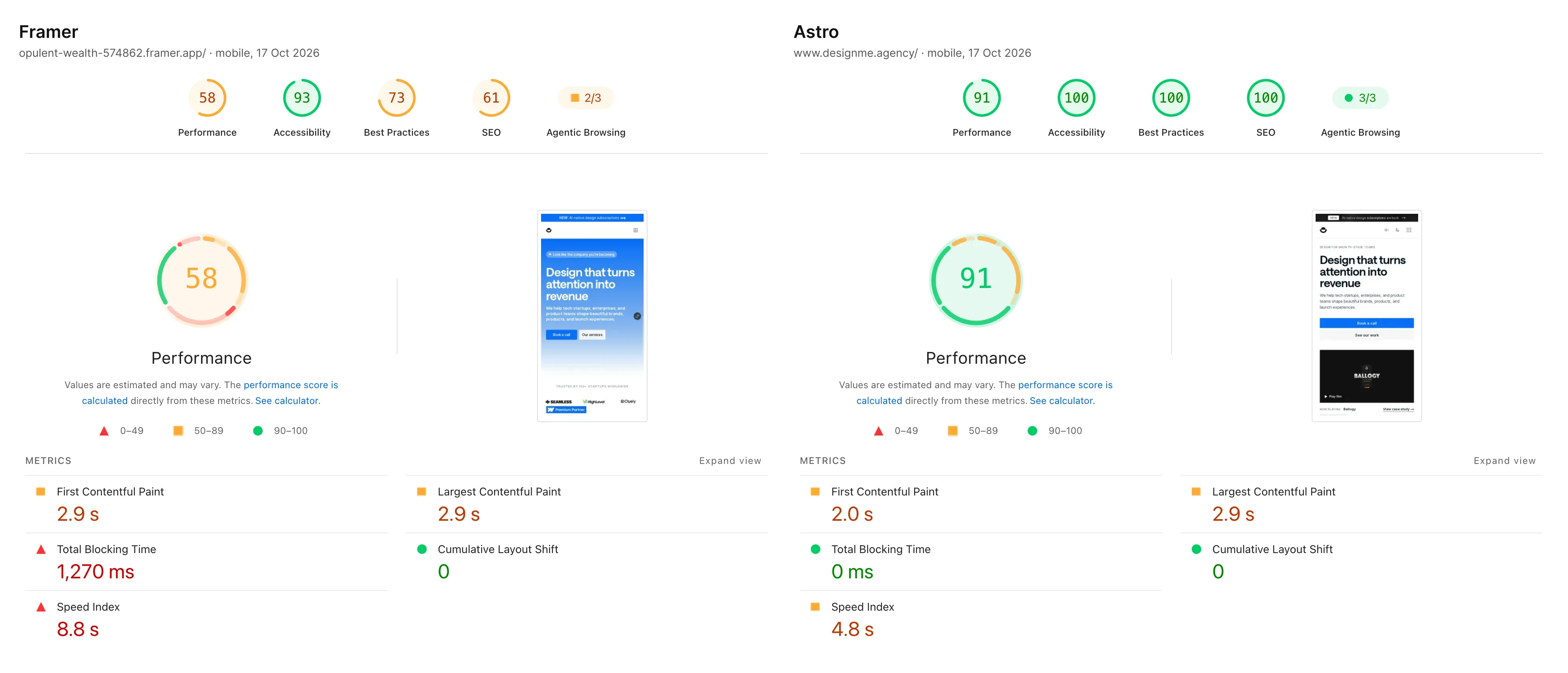
Framer vs Astro, PageSpeed mobiledesignme.agency
How we set up a headless build
Sanity is our usual pick for the CMS, connected with next-sanity on Next.js and the official @sanity/astro integration on Astro. We model the content with you, set up previews, connect publishing to the site, and agree who edits what before the build starts.
Sanity isn’t the only option: Storyblok and Contentful work too, and git-based Keystatic or TinaCMS suit teams that want content in the repository. You own the repository and the hosting account, not us, and the handover includes docs for your team and for the agents that will work on the site after launch.
The Astro development and Next.js development pages go deeper, and every route off WordPress is on our migrations page.
DesignMe handles website migrations for funded B2B SaaS and AI companies. If you are weighing a move off WordPress, send us the site and we will tell you which route fits:
Sources
- WordPress Developer Resources, REST API Handbook (opens in a new tab)developer.wordpress.org
- WP-CLI, wp export (WXR files hold attachment records, not the files) (opens in a new tab)developer.wordpress.org
- Sanity, Visual Editing documentation (opens in a new tab)sanity.io
- Sanity, MCP server documentation (opens in a new tab)sanity.io
- Sanity, How queries work (GROQ) (opens in a new tab)sanity.io
- Astro Docs, Sanity and Astro (opens in a new tab)docs.astro.build
- Next.js Docs, Incremental Static Regeneration (opens in a new tab)nextjs.org
- Vercel, Fair Use Guidelines (Hobby is for non-commercial personal use) (opens in a new tab)vercel.com
- Vercel, Pricing (accessed 10 October 2026) (opens in a new tab)vercel.com
- Google Search Central, Site moves with URL changes (opens in a new tab)developers.google.com
- Cloudflare, "Cloudflare acquires Astro to accelerate the future of high-performance web development" (16 January 2026) (opens in a new tab)cloudflare.com
- Astro, "Astro 6" (10 March 2026) (opens in a new tab)astro.build
Press Escape to close.
Free migration plannerMoving platforms? Plan the redirects
Want us to do it?WordPress to Astro migration