WordPress Redesign Checklist for Teams That Can't Afford to Lose Traffic

Adrian KuleszoCo-founderUpdated
Table of contents
- How to use this checklist
- Phase 1: Before You Touch Anything (The Audit)
- Phase 2: Planning the New Site
- Phase 3: Building the Redirect Map (Non-Negotiable)
- Phase 4: Reproducing SEO on the New Site
- Phase 5: Technical Pre-Launch
- Phase 6: QA on Staging
- Phase 7: Launch
- Phase 8: The First Month (Where Migrations Are Won or Lost)
- Plan your own with the migration planner
- The Honest Truth About Checklists
- FAQs
Most redesign disasters aren’t design problems. They’re checklist problems. The new site looks great, everyone’s happy on launch day, and three weeks later organic traffic is down a third and nobody knows why. I’ve seen it happen to good teams with good designers, and almost every time the cause is the same: something on the technical checklist got skipped because it wasn’t glamorous.
This is the checklist we work through at DesignMe when we redesign or migrate a site. It’s deliberately boring. Boring is what protects your traffic. Work through it in order and a redesign should cost you nothing in rankings, and usually improve them. If the redesign also means leaving WordPress, our website migration services cover each platform move.
I’ll say this up front: this is the checklist we ran on our own move from Framer to Astro in October 2026, and our search traffic didn’t dip. Google sent 190 to 300 clicks a week before the move and 354 in the first four days after it. The checklist below is why.
How to use this checklist
Each phase below has the same three parts. First the list of tasks, in plain words. Then a short table with three columns: the task, who owns it, and how you check it’s done. Then a note on how the same phase went when we moved our own site, designme.agency, from Framer to Astro in October 2026.
The owner column matters more than it looks. Most skipped steps are skipped because everyone assumed someone else had them. The roles are the project lead (runs the redesign, signs off launch), the SEO lead (often the marketing lead on smaller teams), the developer (builds the site, controls the host and DNS), the marketing lead (knows every form, campaign and tool) and the designer. One person can wear three of these hats, but every row needs a name before the project starts.
Our own move is the worked example because I can show you every number. It wasn’t a WordPress site, but it’s the same checklist we run for WordPress clients (the platform changes the export steps, not the order).
- 63
- live URLs inventoried and kept
- 116
- rows in our redirect map
- 885
- internal URLs checked, 0 broken
- 10.33MB → 0.52MB
- homepage page weight, Framer vs Astro
Phase 1: Before You Touch Anything (The Audit)
This phase is the insurance policy. Skip it and you’re flying blind.
- Crawl the entire current site with Screaming Frog or Ahrefs Site Audit. Export every URL: pages, posts, category and tag archives, PDFs, everything. Our free migration planner gives you a first list from your sitemap, with the URLs that need a 301.
- Export top pages by organic traffic from Google Search Console (last 12 months). This is your protection list, the pages you cannot disturb.
- Export top keywords and rankings from Ahrefs and Search Console. Know what you rank for and where, so you can spot movement after launch.
- Pull your backlink profile. Identify which specific URLs have external links. A page with referring domains is carrying authority that must be preserved at that exact URL or redirected cleanly.
- Document on-page SEO for every important page: title tag, meta description, H1, and any structured data. You’ll reproduce these on the new site.
- Screenshot a traffic and rankings baseline the week before launch. If something moves, you need to know what “before” looked like.
- Inventory all forms, integrations, and tracking: analytics, pixels, CRM connections, marketing automation. These break silently if you don’t list them.
| Task | Owner | How to check |
|---|---|---|
| Full crawl of the current site | SEO lead | Export saved, URL count noted, compared with the sitemap |
| Top pages, last 12 months | SEO lead | Search Console export saved with clicks per page |
| Rankings and backlinks | SEO lead | Keyword positions and linked URLs exported, dated |
| On-page SEO record | SEO lead | Title, meta, H1 and schema per important page in one sheet |
| Baseline screenshot | Project lead | Traffic and rankings captured the week before launch |
| Forms, integrations, tracking | Marketing lead | Every lead source and tag listed, with where it sends data |
On our move: we didn’t trust a single source. We crawled the live Framer site, read Framer’s sitemap, saved the HTML of every live page and exported the CMS collections (5 of them, to CSV). The crawl paid off straight away: Framer’s sitemap was missing /design-subscription, which our own navigation linked to. The inventory came to 63 live URLs across seven templates (homepage, 12 case studies, 19 insights, 8 service pages, 7 comparisons, 4 listings and 12 static pages). We also moved 1,378 images and files off Framer’s CDN, because those URLs stop working when the Framer plan ends. On WordPress the same trap is the uploads folder: images hot-linked from old posts, PDFs in emails, files in decks.
The integrations list held the surprises: Google Tag Manager, the Cal.com booking embed, the Notion forms behind our careers links, and a cookie banner. Two of those changed the plan. The “form” on our Framer pages turned out to be Framer’s wrapper around the Cal.com embed, so there was no form backend to rebuild. The cookie banner went the other way: Framer showed it for us, and GTM loads trackers behind it, so the new site needed its own banner (with GTM Consent Mode) before launch. Neither shows up in a crawl.
Phase 2: Planning the New Site
- Decide your URL structure. Will URLs stay the same or change? Every change is a redirect you’ll have to build. Keep URLs identical wherever you reasonably can: it’s the lowest-risk path.
- Map old content to new. Which pages survive as-is, which get merged, which get killed. A redesign is the best content cleanup opportunity you’ll ever get, so use it to remove thin pages that bring nothing.
- Plan your CMS structure: content types, collections, fields. Decide SEO title and description fields now, before importing content.
- Define the design system first: typography, colour, spacing, components. Build pages from the system, not page by page. This is what keeps the site consistent and editable afterward.
- Set your platform. If you’re still deciding, see why teams are moving away from WordPress, and where they go.
| Task | Owner | How to check |
|---|---|---|
| URL structure decision | Project lead | Written rule: which URLs stay, which change and why |
| Content map | Marketing lead | Every page marked keep, merge or remove |
| CMS structure | Developer | Content types and SEO fields defined before import |
| Design system | Designer | Tokens and components exist before page design starts |
| Platform choice | Project lead | Decision recorded, with what it means for URLs and editing |
On our move: the URL rule was the easiest decision of the whole project, because it was “nothing changes”. All 63 live pages kept their exact path, including the old no-trailing-slash rule and slugs with dots in them. All 19 insight URLs stayed as they were. The cleanup happened inside the CMS instead: 75 Locations and Industries entries in Framer were empty drafts, and one draft article had never been published, so none of them were ported as they were. The ones worth having are being written as new pages with their own content, instead of thin copies.
The design system came first too: cleaned-up tokens (type, colour, spacing) rather than a one to one copy of Framer’s values, with every page built from them. That’s what lets you rebuild 63 pages without each one becoming its own project, and it keeps heading structure consistent for Phase 4.
If you’re leaving WordPress for a coded site, our WordPress to Astro page covers what moves cleanly, and Framer limitations for startups covers why we moved our own site into code.
Phase 3: Building the Redirect Map (Non-Negotiable)
This single document protects your traffic more than anything else on the list. In short: list every old URL from your crawl, give each one a destination (same URL, a 301 to its new location, or a 301 to the closest relevant surviving page), never blanket-redirect dead pages to the homepage, and collapse chains to a single hop. Our guide on how to build a 301 redirect map walks through it step by step.
| Task | Owner | How to check |
|---|---|---|
| Collect old URLs from every source | SEO lead | Crawl, sitemap, Search Console, analytics, campaign links and Wayback Machine all merged |
| One decision per row | SEO lead | Every row says same, 301 or gone, with a note on why |
| Single-hop targets | Developer | No row points at another redirect |
| No homepage dumping | SEO lead | Retired pages go to the closest relevant page or return a 404 |
| Host-wide rules | Developer | www, HTTPS, trailing slash and query strings match the old site |
| Rules in the host’s format | Developer | Every line says 301 (Cloudflare Pages defaults to 302) |
On our move: 63 live URLs turned into 116 rows. The live site was only part of it: Framer’s own redirects, hidden pages, broken short links in old articles and old pages that still showed up in the Wayback Machine each needed a decision. In the end 65 rows keep their path, 43 get a 301 and 8 are retired. Every target was checked to answer 200, and every 301 was checked to answer 301 with the right destination, before launch.
Two habits I’d copy on any project. First, the map lives in one CSV and a script generates the host’s redirect file from it, so the map and the live rules can’t drift apart. Second, decisions that weren’t mine went on a separate list for the owner of each page: a post-booking /thank-you page that might be a conversion trigger in GTM or Ads, and a capabilities page that might still be linked from sales decks. Those are exactly the URLs a crawl can’t value for you.
Phase 4: Reproducing SEO on the New Site
- Carry over every title tag and meta description from your audit.
- Preserve heading structure: one H1 per page, logical H2/H3 hierarchy.
- Re-add image alt text. It doesn’t migrate itself.
- Rebuild structured data / schema on the pages that had it.
- Rebuild internal links. WordPress sites accumulate internal links over years; a clean rebuild often loses them. Internal links are a ranking factor, so restore them.
| Task | Owner | How to check |
|---|---|---|
| Titles and meta descriptions | SEO lead | Crawl of staging compared with the Phase 1 sheet |
| One H1 per page | Developer | Crawl report shows no page with zero or two H1s |
| Image alt text | Designer | No image without alt in the crawl |
| Structured data | Developer | Rich Results Test passes on each template |
| Internal links | SEO lead | Links in old posts and the footer point at final URLs, not redirects |
On our move: the rule in our repo is short: every page keeps its title, meta description, canonical and OG tags. On top of that we set lengths (titles at most 60 characters, meta descriptions 120 to 160) and added Article structured data to the insights. The sitewide QA pass before launch found 0 pages with more or fewer than one H1 and 0 images without alt text. One catch: our ported case study pages came across with generic alt text (“Client project, visual 3”), which passes the check and still says nothing. Read a sample, don’t just count.
We also fixed internal links in old articles that pointed at shortened slugs, so they now point at the full URL.
Phase 5: Technical Pre-Launch
- Generate a new XML sitemap.
- Set canonical tags correctly on every page.
- Check robots.txt: make sure you’re not accidentally blocking the new site or leaving it noindexed.
- Verify the new site in Search Console before launch where possible.
- Test page speed and Core Web Vitals on staging, on real pages, on mobile.
- Re-implement all tracking: analytics, pixels, CRM. Test that events actually fire.
- Test every form end to end. A broken contact form on a B2B site is lost revenue, not just lost UX.
| Task | Owner | How to check |
|---|---|---|
| XML sitemap | Developer | Lists every indexable page, no noindex or redirected URLs |
| Canonicals | Developer | Each page points at its own final URL |
| robots.txt and noindex | Developer | Staging blocked, production build has no noindex anywhere |
| Speed and Core Web Vitals | Developer | Measured on real pages, on mobile, against the old site |
| Tracking | Marketing lead | Each tag fires once, after consent where consent applies |
| Forms | Marketing lead | A test submission arrives in the CRM or inbox, for every form |
On our move: staging and production were two different builds on purpose. Staging went out with a noindex header; the production build had none, and carried the redirect file and the form functions. That split avoids the classic “we launched with noindex still on” mistake, because nobody has to remember to remove anything.
Forms were a real launch blocker, not a checkbox. On staging, our contact and referral forms sent nothing: they showed a “preview only” message. Before launch both got a working backend that forwards leads to our email tool. On a WordPress site the version of this is a contact form plugin that nobody on the current team installed (more on that in the take below).
Speed is where a redesign usually earns something back. On our homepage, measured with PageSpeed Insights on desktop, the page went from 10.33MB and 512 requests on Framer to 0.52MB and 75 requests on Astro (all the numbers in our Framer to Astro migration results). If you need to set a launch bar for speed and analytics, our website launch checklist covers Core Web Vitals, consent and analytics in more detail.
Why the technical phase matters
Our own homepage, first load before and after the move.
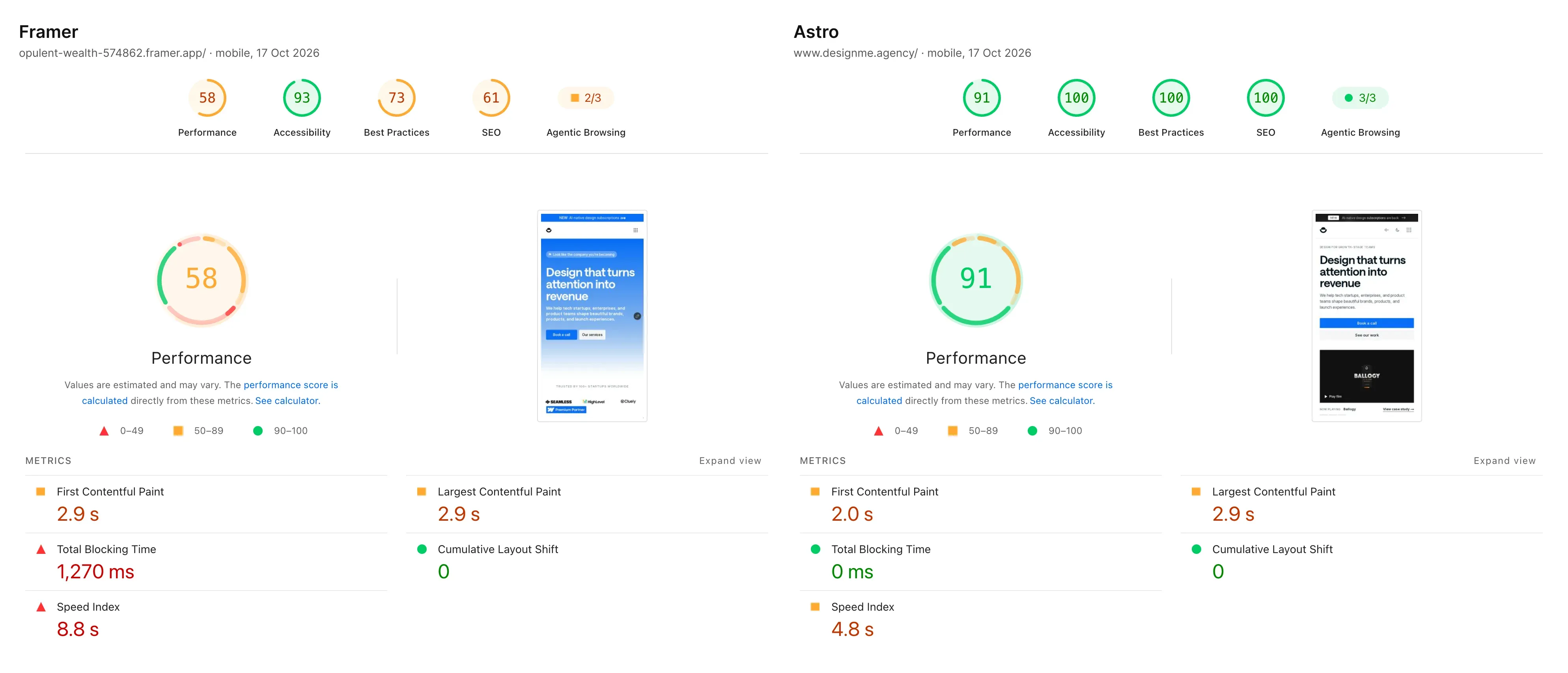
Framer vs Astro, PageSpeed mobiledesignme.agency
Phase 6: QA on Staging
- Click every internal link. Every one.
- Test every redirect from the map: each old URL should land on the right new page.
- Check the site on mobile, tablet, and desktop.
- Proofread. Migrations introduce copy errors more often than you’d think.
- Test in multiple browsers.
| Task | Owner | How to check |
|---|---|---|
| Internal links | Developer | Crawler run on staging: zero 404s, zero links to redirects |
| Redirects | SEO lead | Every row of the map tested in list mode: right code, right target, one hop |
| Devices | Designer | Every template at phone and desktop width, no sideways scroll |
| Copy | Marketing lead | Every page read once by someone who didn’t write it |
| Browsers | Developer | Key pages in the browsers your analytics shows |
| Console and requests | Developer | No script errors, no failed requests |
On our move: we ran one automated pass over the production build of every page in the sitemap: 219 pages at a desktop and a phone width, 438 renders in total. It checked 885 unique internal links (0 broken, 0 pointing at redirects), 871 external links (1 dead, 1 malformed), console errors (0), failed requests (0) and sideways scrolling (0 at both widths). The malformed link is a good example of what QA is for: the markdown processor had turned the text “www.” in one article into a broken link to http://www. Nobody would have spotted that by reading.
The same pass found things that weren’t broken but weren’t right either (case study images at about 1x on retina screens, headings breaking onto three lines). None of it would cost traffic, but each item went on a list with a decision next to it.
Phase 7: Launch
- Launch early in the week, not before a weekend, so you’re around to catch problems.
- Implement all 301 redirects at go-live.
- Submit the new sitemap in Search Console immediately.
- Request indexing of your most important pages.
| Task | Owner | How to check |
|---|---|---|
| Launch day | Project lead | Early in the week, with the developer and SEO lead available |
| Redirects live | Developer | A sample of old URLs answers a real 301 on the live domain |
| Rollback plan | Developer | Written down: what to switch back and who can do it |
| Smoke test | Project lead | Key pages, every form, booking, consent banner and tags on the live domain |
| Sitemap and indexing | SEO lead | Sitemap submitted, priority pages requested in Search Console |
Our cutover, in order
Deploy
Production build with redirects and no noindex header.
Point the domain
Switch DNS to the new host, keep the old one ready.
Smoke test
Key pages, forms, a sample of 301s, robots.txt, sitemap.
Tracking
Consent banner, tags and the booking embed on the live domain.
Submit
The new sitemap in Search Console.
On our move: we moved hosts on Monday 12 October 2026. The new host was Cloudflare Pages, and the domain switch was a DNS change, so the rollback was the same change in reverse. I’d write that rollback line into any launch plan. Our cutover plan put the smoke test on the live domain, not staging: key pages, both forms, a sample of redirects answering as real 301s, robots.txt, the sitemap, no noindex header, the consent banner with the tags behind it, and the booking embed. Only then does the sitemap go into Search Console.
Test a few redirects on the live domain, not just staging. Cloudflare Pages treats a redirect line without a status code as a temporary 302, and only the live host can prove what it actually sends.
Phase 8: The First Month (Where Migrations Are Won or Lost)
The work isn’t done at launch. This phase is where you save or sink the redesign.
- Monitor organic traffic daily against your pre-launch baseline.
- Watch the Search Console Coverage report for crawl errors and unexpected 404s.
- Re-crawl the live site after a few days to catch missed redirects or broken links.
- Track keyword rankings for your priority terms.
- Expect a small dip in week one as Google re-crawls and re-indexes, and that’s normal. A dip that doesn’t recover within a few weeks means something’s broken, usually a redirect gap. Find it fast.
| Signal in the first month | What it usually means | What to do |
|---|---|---|
| A small dip in week one | Google is re-crawling and re-indexing | Normal: keep monitoring daily |
| A dip that doesn’t recover within a few weeks | Something’s broken, usually a redirect gap | Re-crawl the live site and find it fast |
| Unexpected 404s in the Coverage report | Missed redirects or broken links | Fix the missing redirects fast |
| Task | Owner | How to check |
|---|---|---|
| Daily traffic check | SEO lead | Organic sessions compared with the baseline, every day for the first weeks |
| 404 watch | SEO lead | 404 landings in analytics and Search Console reviewed, each one mapped or accepted |
| Re-crawl | Developer | Live site crawled a few days after launch, new issues fixed |
| Rankings | SEO lead | Priority keywords compared with the Phase 1 export |
On our move: the map wasn’t finished at launch, and I’d expect the same on any project. Two days after the switch, the 404 report in our analytics (Plausible) showed real visitors landing on URLs that weren’t in the map: /blog, /lite and an old Framer draft path. There had never been a /blog section on our site at all, and visitors still tried it. Each got a 301 (/lite to the design subscription page, the draft path to the page it became), and /blog/* got one pattern rule to /insights, since the slugs match. That’s the whole job of the first month: read the 404s, decide, add a row.
On our own move, the first days brought exactly this kind of gap, just small: a few old paths that never made it into the map (/blog, /lite), caught by a 404 goal in our analytics and redirected the same week. Traffic didn’t dip because they were found fast.
Plan your own with the migration planner
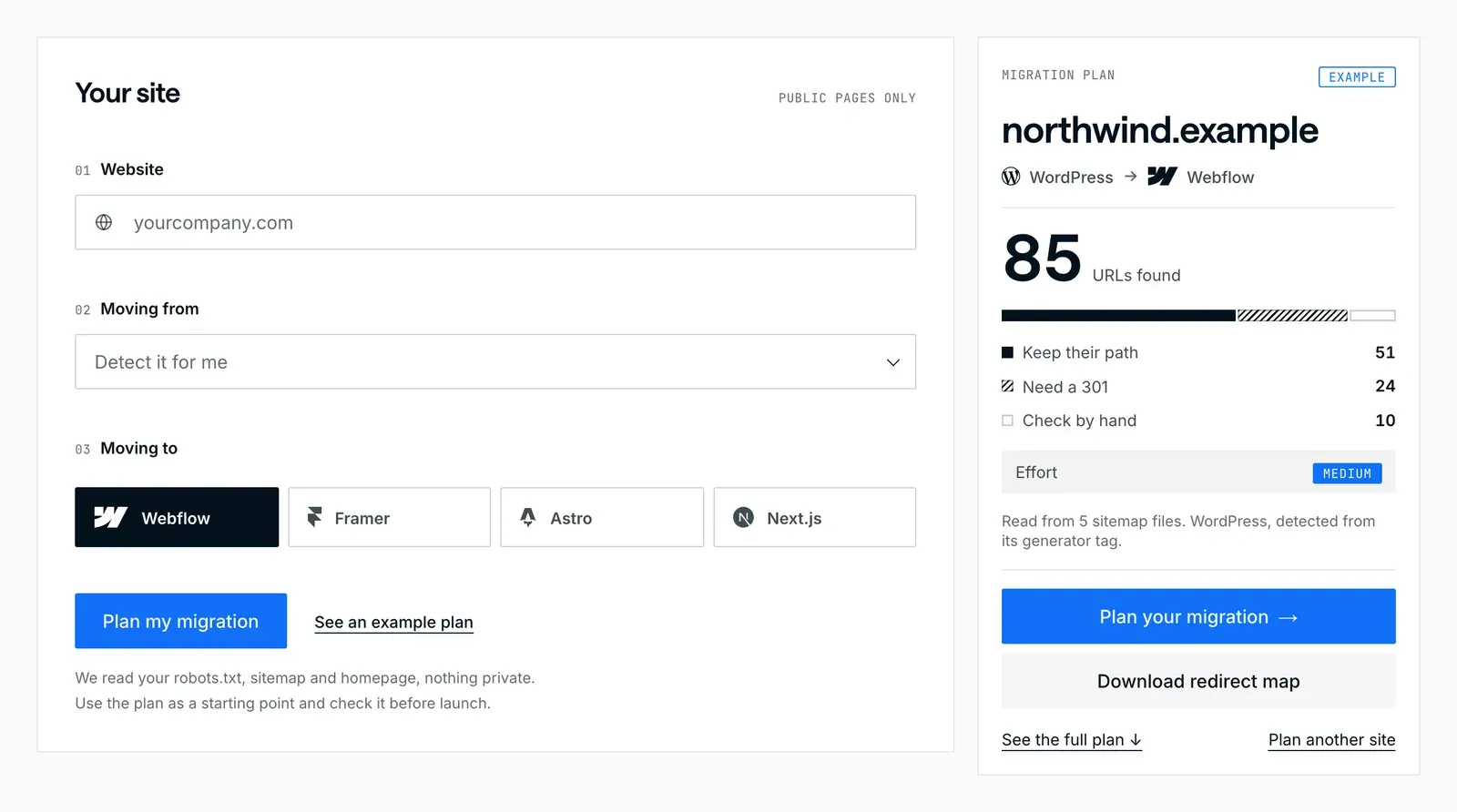
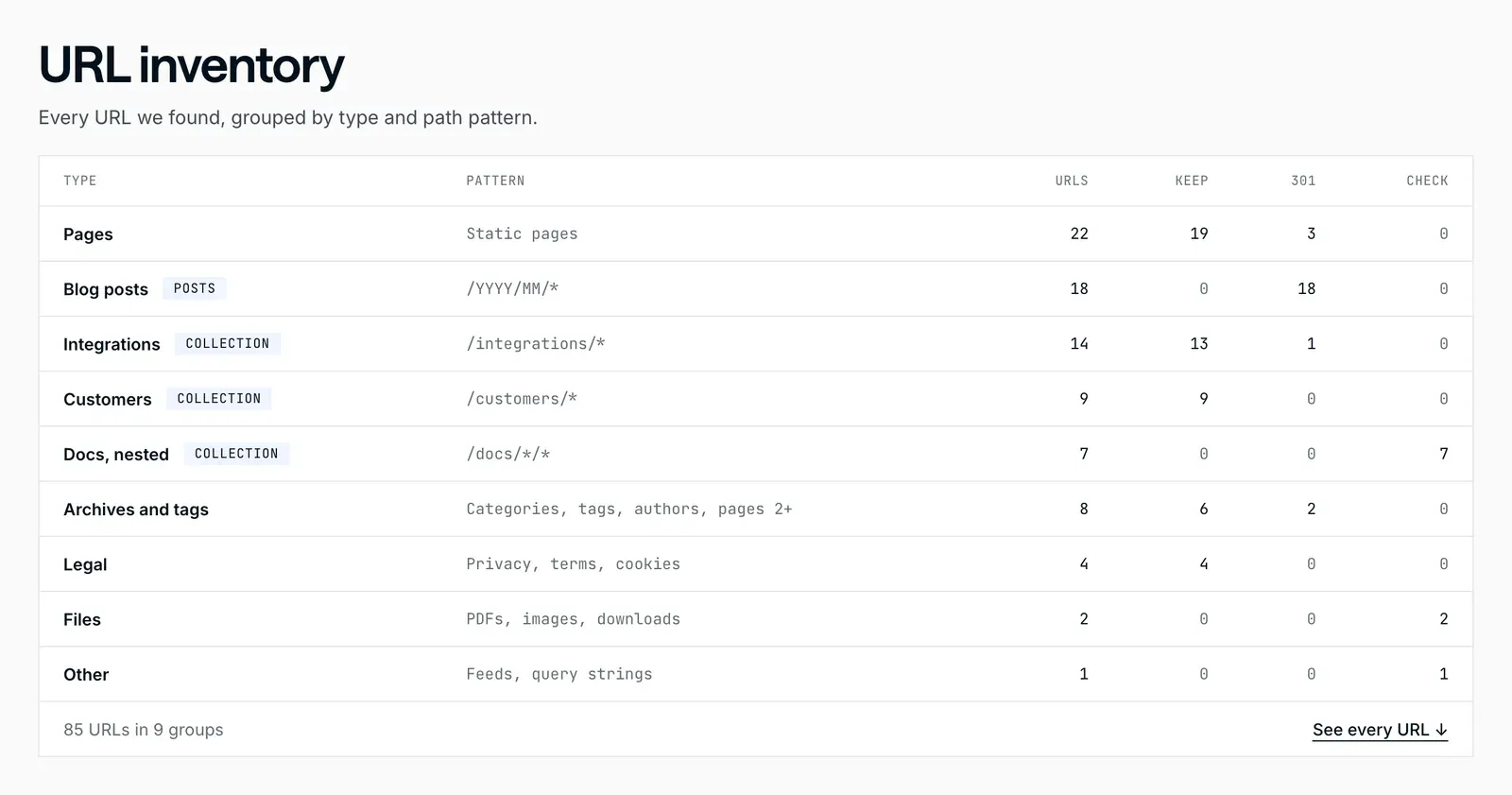
You can do Phase 1 and the first draft of Phase 3 in a few minutes with our free migration planner. Enter your site and the platform you’re moving to (Webflow, Framer, Astro or Next.js). It reads your robots.txt, sitemap and homepage (nothing private), lists every URL by type, shows which keep their path and which need a 301, and builds a redirect map file the new platform can import, plus a CMS export checklist and an effort band.
Treat its output as the start of the map, not the map: it reads your sitemap, and as our own move showed, sitemaps miss pages. Add the Search Console export, analytics landing pages, campaign links and the Wayback Machine before you trust it. If you’re also pricing the move, how much a WordPress migration costs breaks down where the effort goes.
The migration planner, step by step
The Honest Truth About Checklists
None of this is clever. It’s discipline. The teams that lose traffic in a redesign aren’t the ones who lack talent; they’re the ones who treated SEO as a launch-day task instead of a pre-launch discipline. By the time you launch, every protection on this list should already be built and tested.
Eight phases, one launch day
- Before launch
Audit
- Before launch
Plan the site
- Before launch
Redirect map
- Before launch
Reproduce SEO
- Before launch
Technical checks
- Before launch
QA on staging
- Launch day
Launch early in the week
- The first month
Daily checks
Traffic, 404s, rankings.
If you want the platform-specific versions of this process, see how to move WordPress to Webflow, step by step and how to move WordPress to Framer, step by step. And for the deeper dive on protecting rankings specifically, how to migrate from WordPress without losing SEO goes further on the search side. If you’d rather hand the search side over, redirects, metadata and structured data are part of our SEO and AEO work.
DesignMe redesigns and migrates websites for funded B2B SaaS and AI companies, with SEO preservation built into the process from the first audit. If you’re planning a redesign and can’t afford to lose traffic, our intro call is 30 minutes and we’ll tell you honestly what the project actually involves:
Want us to do it?Our website migration service