Website Launch Checklist for Funded Startups: SEO, AEO, Analytics, Performance and Legal

Adrian KuleszoCo-founderUpdated
Table of contents
- Before anything: ownership and access
- How we ran the checks on our own launch
- Search: the basics Google needs
- Answer engines: being readable by AI
- Analytics: measure from day one
- Performance: fast on a phone
- Legal: the basics for US and EU visitors
- Forms and integrations
- Launch day and the first two weeks
- Launching with us
- FAQs
Most launch problems are small and boring: a staging noindex left on, a form that never reaches the CRM, analytics that fire before consent. Check five areas before you go live (search, answer engines, analytics, performance and legal), and the first month is spent on growth instead of fixes.
This is the list we run at DesignMe before a new site goes live for a funded startup. It applies just as well to a B2B manufacturer or a DTC brand launching a new site. If you’re replacing an existing site and need to protect its traffic, start with our redesign and migration checklist and use this one alongside it.
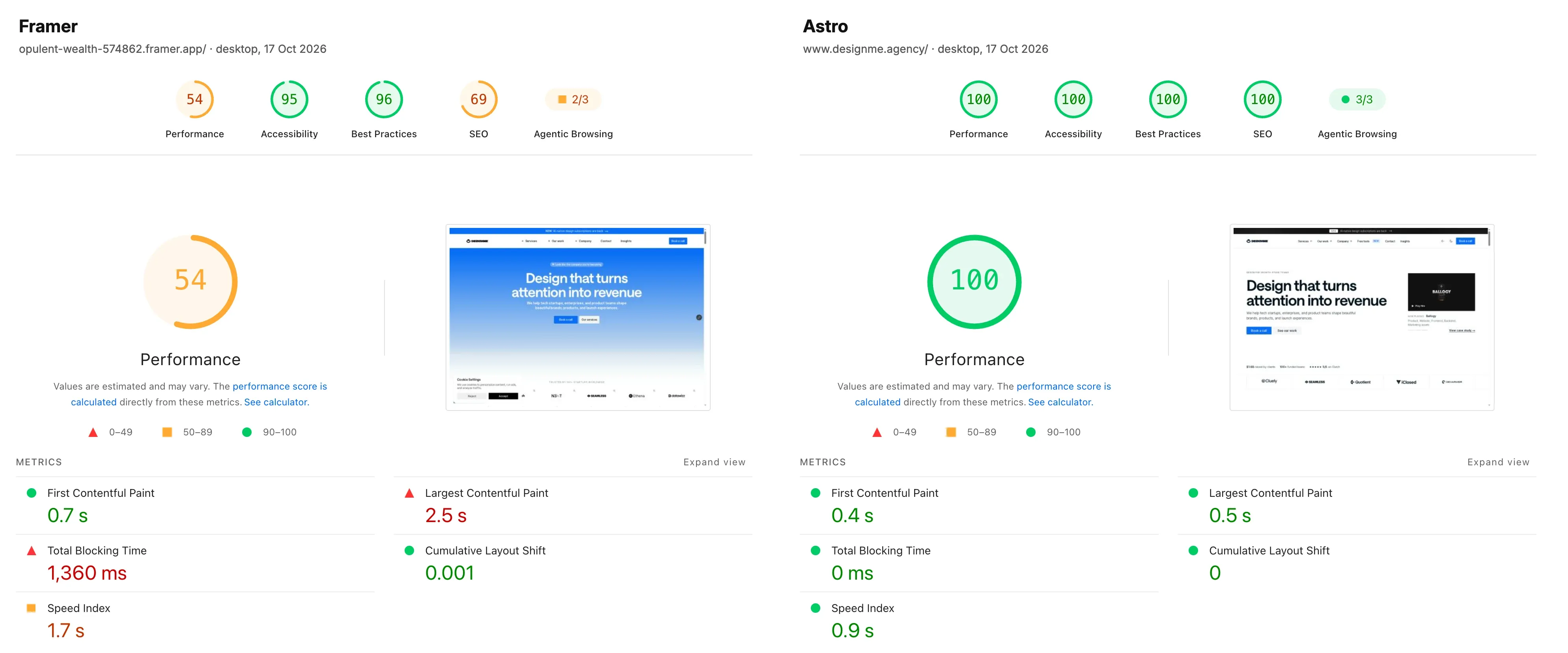
It’s also the list we ran on ourselves. We moved designme.agency off Framer and onto Astro, hosted on Cloudflare Pages, and it went live on 12 October 2026. So each section below has the checks, a table of what to do and how to check it, and what those checks found on our own launch (including what we got wrong first).
Before anything: ownership and access
Make sure the company owns the domain, DNS, hosting, CMS, analytics, Search Console and tag manager accounts, with at least two people who can log in. Agencies and freelancers should be added as users, not owners. It takes ten minutes now and saves weeks if someone leaves.
The same goes for the cutover. On our own move, nothing touched hosting or DNS without the owner’s written OK, and he set every API key himself: the team prepared the deploy script and the runbook, and the switch happened with the owner at the keyboard.
How we ran the checks on our own launch
Here’s the order we followed, the same one we use for client launches. Every staging build went out with a noindex header. The day before cutover we crawled the production build: all 219 sitemap pages at 1440px and 390px wide, 438 renders in a headless browser, each page scrolled to the bottom so lazy images loaded, then measured. That crawl produced a fix list, and only then did we switch the domain.
Our own launch, in order
Staging
Every build deployed with a noindex header.
QA crawl
219 pages at desktop and phone widths, 438 renders.
Fix list
Links, images, headings and titles, ranked.
Cutover
The production deploy refuses to ship a noindex.
Watch
404 landings, Search Console, share cards, new redirects.
The crawl was mostly reassuring: 0 broken internal links across 885 unique URLs, 0 console errors, 0 images without alt text and 0 pages without exactly one H1. It found 1 dead external link and 1 malformed one, where our markdown processor had turned a bare “www.” into a link to http://www (nobody would have spotted that by reading the page).
- 219
- pages crawled before cutover
- 0
- broken internal links across 885 URLs
- 43
- old URLs redirected with a 301
- 86 to 97
- mobile PageSpeed score on our homepage
The rest was quality, not breakage: 59 image renders below 1.5x pixel density (case study stills exported too small for retina screens) and headings that broke onto three lines. Those went to the owner as a ranked list with the cause next to each one.
Search: the basics Google needs
- Remove the staging noindex. Staging sites are usually hidden with a noindex tag or header, and it is easy to ship to production. Check the live homepage source on launch day.
- Don’t use robots.txt to hide pages. Google is clear that robots.txt is not a way to keep a page out of its results. Use noindex or a password for that.
- Submit the sitemap. Add it in Search Console’s Sitemaps report and list it in robots.txt.
- Set canonical tags. Each page should point a canonical at its own preferred URL. Google says not to use robots.txt for canonicalisation.
- Titles and descriptions. Unique on every page. We keep titles at 60 characters or less with the main keyword first, and descriptions between 120 and 160 characters.
- One H1 per page, with headings that form an outline.
- Open Graph tags and a share image, so links look right in Slack and LinkedIn.
- A useful 404 page that links to the main sections.
- Redirects for every URL that changes. One 301 hop from the old URL to the closest new page. Our redirect map guide walks through building one.
| Task | Why | How to check |
|---|---|---|
| Staging noindex removed | A leftover noindex hides the whole site from Google | View the live homepage source and its response headers on launch day |
| Sitemap submitted | Google finds every page sooner | Search Console’s Sitemaps report, and a sitemap line in robots.txt |
| Self-referencing canonicals | Stops duplicate URLs competing | Crawl the site and compare each canonical with the page’s own URL |
| Unique titles and descriptions | They are the search snippet | Crawl export: titles 60 characters or less, descriptions 120 to 160 |
| One H1 per page | Headings form the page outline | Crawl export: count H1s per URL |
| 301s for changed URLs | Keeps links and rankings | Request a sample of old URLs and check for one 301 hop |
| Share image on every page | Links look right in Slack and LinkedIn | Paste a few URLs into a Slack message or a LinkedIn draft |
What this looked like on our site
The staging noindex is the bug I worry about most, because it fails silently: the site looks perfect and Google is told to ignore it. So we stopped relying on memory. Staging adds an X-Robots-Tag: noindex header to every response, and our production deploy script refuses to run if the build carries a noindex in its headers file or on the homepage.
For redirects, we mapped every URL the old Framer site answered, today or in the past (a live crawl, the Framer sitemap, the CMS exports and the Wayback Machine): 65 paths stayed the same, 43 got a 301, and 7 were left to the 404 page. None of the 63 live pages changed URL. The method is in our Framer to Astro write-up.
Every page got its own share image (228 of them, 31 designed in Figma and 197 generated in the same style), and after launch we had to version their URLs, because X and LinkedIn cached the old ones. If you change a share card after launch, change its URL too.
On 18 October a second crawl caught what had drifted since launch: duplicate element ids, and a few titles and descriptions outside our length rules. A site keeps changing, so the crawl shouldn’t be a one-off.
Answer engines: being readable by AI
Buyers now ask ChatGPT, Claude, Perplexity and Google’s AI features who to hire and what to buy. The good news is that most of this work is the SEO above. Google’s own guidance says there are no additional requirements to appear in AI Overviews or AI Mode, and no special structured data to add.
What’s worth checking on top:
- Crawler access. Each AI company runs separate crawlers. OpenAI’s OAI-SearchBot surfaces sites in ChatGPT search, while GPTBot collects training data. Anthropic runs Claude-SearchBot for search quality and ClaudeBot for training. PerplexityBot surfaces sites in Perplexity and, according to Perplexity, is not used to train foundation models. Allow the search crawlers unless you have a reason not to, and decide about training crawlers separately.
- Plain HTML. Many AI crawlers don’t run JavaScript, so text that only appears after a script or inside a tab can be missed. Check the page source, not the rendered page.
- Structured data. Google recommends Organization markup on the homepage or about page, and Article or BlogPosting markup on posts, with dates and authors.
- Answer-first pages. Pricing, how it works, comparisons and FAQs, each opening with a plain answer. Our AEO guide covers this in detail.
- llms.txt, honestly. An llms.txt file is a Markdown map of your site, proposed by Jeremy Howard in 2024. Google’s July 2026 guidance says Google Search ignores it, so it does nothing for Google. Some other tools read it, and it’s cheap to generate from your content, which is why we publish one, but it isn’t a launch requirement.
| Company | Search crawler | Training crawler |
|---|---|---|
| OpenAI | OAI-SearchBot, surfaces sites in ChatGPT search | GPTBot |
| Anthropic | Claude-SearchBot, for search quality | ClaudeBot |
| Perplexity | PerplexityBot, surfaces sites in Perplexity | Not used to train foundation models, according to Perplexity |
Run the homepage through our free AEO checker before launch. It reads the page as AI crawlers do, from the raw HTML, and gives a fix for every gap.
| Task | Why | How to check |
|---|---|---|
| Search crawlers allowed | They decide if you can appear in ChatGPT search, Claude and Perplexity | Read robots.txt for OAI-SearchBot, Claude-SearchBot and PerplexityBot |
| Main content in plain HTML | Many AI crawlers don’t run JavaScript | View source (not the inspector) and search for a sentence from the page |
| Organization and Article markup | Google recommends both | Google’s Rich Results Test on the homepage and one post |
| Answer-first openings | Engines quote the plain answer | Read the first two lines of pricing, how it works and the FAQ |
| A baseline AEO score | Shows the gaps before buyers do | Run key pages through the AEO checker |
What our own checker found on our own pages
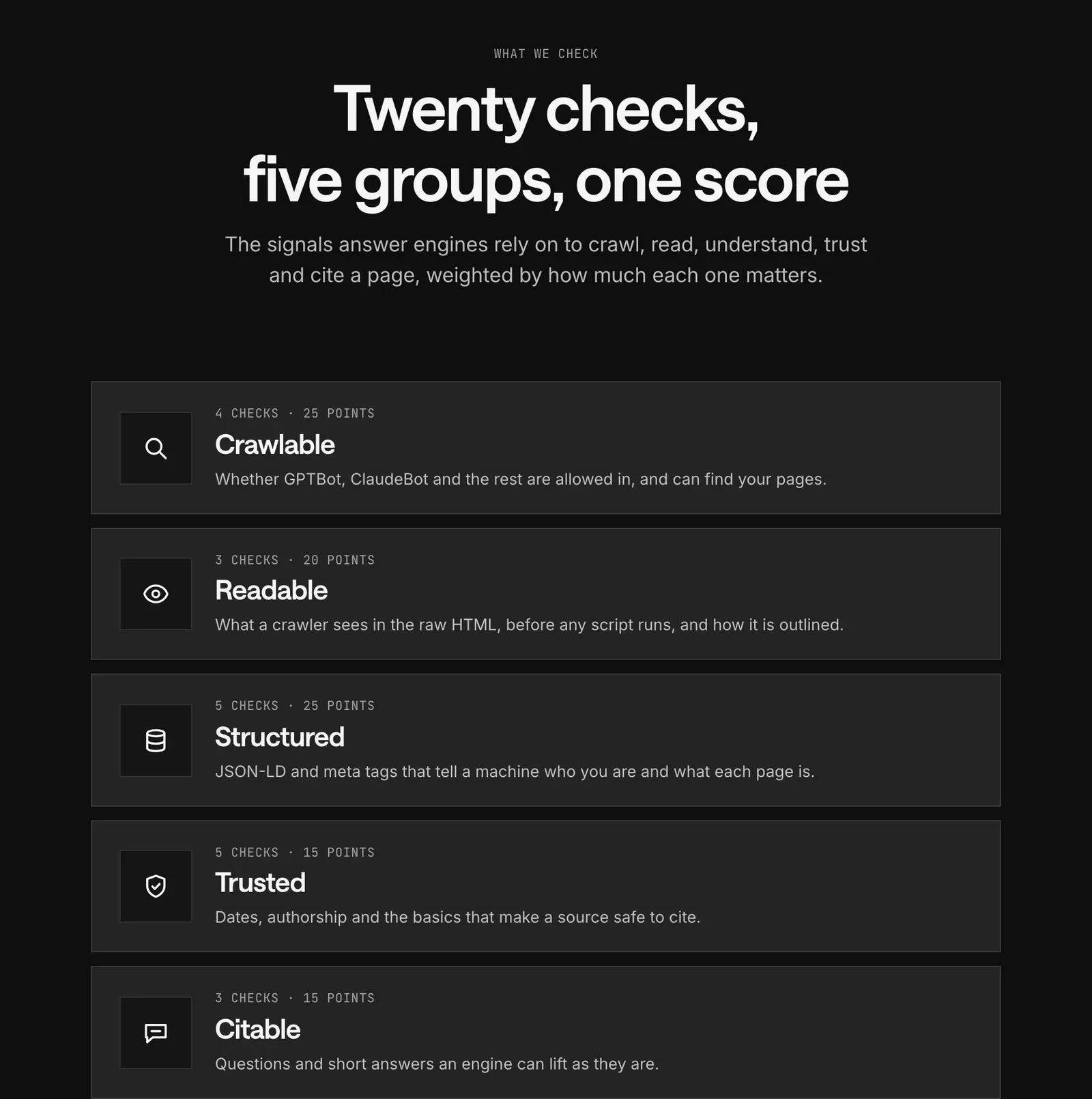
We built the AEO checker for clients, then pointed it at ourselves: at launch the new site scored 89/100. After the fixes below, a re-run on 18 October 2026 gave the homepage 95/100, this kind of article 95, the design subscription page 91 and the Webflow agency page 96. The one group still short everywhere is “citable”: more short, quotable answers on each page.
The useful part was the gaps, not the score. The self-check flagged that the homepage had no page-level schema and no dates, so on launch day we added a WebPage node with a dateModified and a breadcrumb. Organization and WebSite markup is emitted once, sitewide, and our llms.txt is generated from the same data as the pages, so neither drifts.
Before any launch, run the checker on the homepage, a service page and one article, and fix what it flags. Our SEO and AEO service starts the same way, with an audit week before any new content.
What our AEO checker looks at
AEO checkerDesignMe
Analytics: measure from day one
- Pick three conversion events before launch, such as demo booked, contact form sent and signup started, and test that each one fires.
- Load tags only after consent for visitors who need it (see the legal section). Google’s Consent Mode v2 adds the
ad_user_dataandad_personalizationsignals, and Google requires consent to keep using its tags for measurement and ad personalisation for users covered by its EU user consent policy. On our own site, for visitors in the EU, EEA, UK and Switzerland, Google Tag Manager loads only after a visitor allows analytics or marketing, with every consent signal denied by default. - Set GA4 data retention to 14 months, the longest option for standard properties, so year-on-year comparisons work.
- Verify Search Console and link it to analytics.
- Use UTM tags on launch posts, emails and ads, so you know what the launch actually drove.
| Task | Why | How to check |
|---|---|---|
| Tags wait for consent | EU and UK law, and Google’s own consent policy | Private window, reject cookies, then check the Network tab for tag requests |
| Three conversion events | You can’t fix what you can’t see | Submit each form and watch the events arrive in your analytics |
| 14-month data retention | Year-on-year comparisons | GA4 Admin, Data retention |
| Search Console verified | Indexing and query data from day one | Search Console shows the property as verified |
| UTM tags on launch links | Shows what the launch drove | Click your own launch post and check the source in analytics |
What we found in our own tag setup
Here’s what surprised us: Consent Mode alone wasn’t enough. Our Tag Manager container holds Custom HTML tags (the Meta Pixel, X, Apollo, Clarity and Ahrefs) that ignore consent mode, so loading Tag Manager with consent denied would still have fired them. A banner that looks compliant while pixels fire anyway tells visitors something untrue.
So our gate works one level up. A small script runs first in the page head, sets every consent signal to denied, and doesn’t load Tag Manager at all until the visitor allows analytics or marketing. With analytics allowed but not marketing, Custom HTML tags are blocklisted. Withdrawing consent deletes the trackers’ cookies, and the choice is kept for six months.
How our consent gate loads tags
Page loads
Every consent signal denied, no Tag Manager.
Visitor chooses
Accept all, Reject all or pick categories.
Analytics only
Tag Manager loads, Custom HTML tags blocked.
Marketing too
Ad pixels wait for a real first interaction.
Two changes came in the first week. The banner now shows only in Europe (decided from the browser’s time zone before the first paint, so nothing shifts), and everyone else can opt out from “Cookie settings” in the footer. And the Meta and X pixels fire on a visitor’s first real interaction, never on a timer, so idle visits and test bots get no ad cookies.
For lead tracking we also run Plausible, a cookieless analytics tool, outside the consent gate, with a goal for every form and a 404 goal that records the requested path. That 404 goal turned out to be one of the most useful things we set up (more in the last section).
We checked the result from the outside on 18 October 2026. Our Tag Manager container no longer has the duplicate Apollo tag (the two old tags are paused and ship no code). Loading the live homepage from Europe with no choice made, the banner shows, Tag Manager doesn’t load, and the only third-party request is Plausible. The five Custom HTML tags (the Meta pixel, the X pixel and its event tag, Clarity and Ahrefs) still have no consent setting of their own inside Tag Manager, so the gate on the page is what holds them back; adding a consent check to each tag is the belt-and-braces step we have left.
Performance: fast on a phone
Google’s Core Web Vitals call a page good when the largest element loads within 2.5 seconds (LCP), the page responds to input within 200 milliseconds (INP) and layout shift stays at 0.1 or less (CLS), measured at the 75th percentile of page loads. INP replaced First Input Delay as a Core Web Vital in March 2024.
- 2.5s
- or less for the largest element to load (LCP)
- 200ms
- or less to respond to input (INP)
- 0.1
- or less layout shift (CLS)
Test on a mid-range phone on a mobile connection, not on the office laptop. The usual culprits are oversized images, too many fonts, video that autoplays above the fold and third-party scripts such as chat widgets and booking embeds. Load embeds when the visitor clicks or scrolls to them, not on page load.
| Task | Why | How to check |
|---|---|---|
| LCP 2.5s or less | The first impression on a phone | PageSpeed Insights on mobile for the homepage and top landing pages |
| INP 200ms or less | Taps that lag feel broken | Tap the first buttons on a real phone; Chrome’s Performance panel shows long tasks |
| CLS 0.1 or less | Nothing jumps while people read | Lighthouse, and watch the page load with fonts and banners |
| Third-party scripts deferred | Tags and embeds compete with your own content | Network tab on first load: what loads before anyone touches the page |
| Cache headers set | Repeat visits load from the browser | Response headers on a CSS or JavaScript file |
What moved the numbers on our homepage
Our homepage isn’t light: a video reel in the hero, client logos, a cookie banner and a full Tag Manager container. Here’s what changed its numbers, in order.
| Change | What it did |
|---|---|
| Inline every stylesheet | No render-blocking CSS requests. Mobile Lighthouse 92 to 93 became 97 to 98, Speed Index 5.1s became 2.0s |
| Preload only the headline font | The body font’s preload was competing with it on slow connections. A metric-matched fallback keeps CLS at 0 |
| Logos as lossless WebP | 634 KB of logos became 394 KB, pixel-identical |
| Cache headers | A year for hashed build files and fonts, a week for images, HTML always fresh |
| Tags and hero film on first interaction | Mobile PageSpeed 86 became 97, Total Blocking Time 410ms became 0 |
| UI sounds off on touch devices | The first tap created the audio engine, about 240ms of work |
The biggest single win was inlining every stylesheet, so the browser never waits on a CSS request. Cache headers are easy to miss on a new host: Cloudflare Pages sends max-age=0 by default, so returning visitors re-checked every file until we set a year for hashed build files and fonts, a week for images, and HTML always fresh.
The tag fix has a story behind it. Once the cookie banner became Europe-only, test runs from US servers loaded every tag, and our PageSpeed scores dropped to 62 and 84. The fix was to start Tag Manager and the hero film on the visitor’s first interaction (a touch, a key or the mouse), with an 8-second fallback for tags and 6 for the film. That took mobile PageSpeed from 86 to 97 and Total Blocking Time from 410ms to 0. So test with the tags your buyers will actually get.
The INP fix was the most humbling. Our site plays small interface sounds, and the first tap on a phone spent about 240ms starting the browser’s audio engine, more than the whole 200ms budget. Touch devices now start with sounds off (you’d never find that from a desktop). At launch we measured Largest Contentful Paint at 0.9 to 1.4 seconds on a throttled mid-range phone; field data takes a few weeks to confirm it.
What our performance work did
Homepage, PageSpeed desktopdesignme.agency
Legal: the basics for US and EU visitors
This is general information, not legal advice. Check the specifics with your counsel.
- Privacy policy that says what you collect, why, who you share it with and how people contact you.
- Cookie consent in the EU and UK. Non-essential cookies need prior consent. The EU Court of Justice ruled in Planet49 (2019) that a pre-ticked box is not valid consent, and France’s CNIL says refusing cookies should be as easy as accepting them. A “Reject all” button next to “Accept all” covers most of it.
- California. The CCPA applies to businesses over $26,625,000 in annual revenue (the 2025 adjusted threshold), or that buy, sell or share the personal information of 100,000 or more California consumers or households, or earn half their revenue from selling it. Covered businesses need a privacy policy, a “Do Not Sell or Share My Personal Information” link if they sell or share data, and must honour Global Privacy Control signals.
- Accessibility. The European Accessibility Act has applied since 28 June 2025 to services such as e-commerce and consumer banking, with an exemption for service providers under 10 staff and €2 million turnover. DTC brands selling into the EU are the startups most likely to be covered. Even when it doesn’t apply, contrast, labels, alt text and keyboard use are worth checking for every visitor.
- Germany. If you run a business site aimed at Germany, the Digital Services Act (DDG) has required an easily found, always available provider notice, the Impressum, since 14 May 2024.
- Terms of service if visitors can sign up, buy or download anything.
| Task | Why | How to check |
|---|---|---|
| Privacy policy | Required wherever you collect personal data | Linked from the footer and from every form |
| Reject as easy as accept | Planet49 and the CNIL’s guidance | “Reject all” sits next to “Accept all”, same size and weight |
| Consent can be changed later | Visitors can withdraw at any time | A footer link reopens the banner |
| CCPA, if it applies | California’s thresholds and the GPC signal | Revenue and data volume against the thresholds, with counsel |
| Accessibility basics | The European Accessibility Act, and every visitor | Contrast, labels, alt text and a full keyboard pass |
| Impressum, if you target Germany | The DDG requires it | A provider notice one click from every page |
On our own banner, “Accept all” and “Reject all” have equal weight, “Settings” opens separate analytics and marketing switches, and the footer’s “Cookie settings” reopens it. Our QA crawl also checked something easy to skip: on a 390px phone the banner takes 24% of the screen, so we confirmed the hero buttons still show above it on the homepage, a service page and the contact page.
Forms and integrations
Submit every form on the live site and follow it all the way: the confirmation message, the email, the CRM record, the Slack alert. Check spam protection, booking embeds and any pricing calculators. A broken demo form on a B2B site is lost pipeline, and it is the bug nobody notices until sales asks where the leads went.
Here’s a trap worth knowing about. Our contact form is two steps (step one saves a partial lead, so a half-finished enquiry isn’t lost), and both go through small server functions on the host, with a spam honeypot and a rate limit. Staging doesn’t run those functions, so there every form shows its fallback: our email address, with the visitor’s text kept on screen. That means the only real end-to-end test happens on the production domain, so “submit both forms and check the record” sat on the cutover list itself, next to the DNS change.
Write that failure state before launch, and load booking embeds only on click or scroll, as our Cal.com embed does.
Launch day and the first two weeks
Launch early in the week, so the team is around to catch problems. Then, for two weeks:
- Check Search Console daily for indexing problems and crawl errors.
- Re-crawl the live site after a few days for broken links and missing redirects.
- Confirm conversion events and form submissions are still arriving.
- Ask your ten most important buyer questions in ChatGPT, Claude, Perplexity and Google, and record where you appear, so you have a baseline for later.
- Give Core Web Vitals field data a few weeks to build up before judging it.
On our own launch, the most useful signal in week one was the 404 goal. Two days after go-live it showed people landing on paths our redirect map didn’t cover: /blog and /blog/<post> (there was never a /blog section, the site has always used /insights), /lite, and an old draft path of a hidden page. None of that shows up in a crawl of the old site. We added 301s for each on 14 October (/blog/<post> goes to the same slug under /insights), and one more the next day for an old /case-studies/services/ path. So keep a 404 report running after launch and read it every few days: it lists the URLs visitors expect that your redirect map never knew about.
Launch day and after
Launch day
Launch early in the week
Check the live source for a leftover noindex.
Daily for two weeks
Search Console
Indexing problems and crawl errors.
After a few days
Re-crawl the live site
Broken links and missing redirects.
First two weeks
Events and forms
Confirm they are still arriving.
AI answer baseline
Ten buyer questions in four tools.
After a few weeks
Core Web Vitals
Judge the field data once it builds up.
Launching with us
Every site we build ships with this list done. A website starts from $15k and a landing page from $10k, usually 2 to 3 weeks for a landing page and 1 to 3 months for a full site. For a raise or launch date, our Brand + Website + Launch Video package is $25k and goes live in 2 to 8 weeks, with an SEO-ready structure from day one. If you are still budgeting, our free website cost calculator shows what year one costs, and SEO and AEO work continues after launch if you want it.
DesignMe designs and builds websites for funded SaaS and AI companies, with SEO, AEO, analytics and performance checked before launch, not after. If your launch date is set and you want a second pair of eyes on the list, send us the staging link and we’ll reply within one business day:
Sources
- Google Search Central, "Build and submit a sitemap" (updated 8 July 2026) (opens in a new tab)developers.google.com
- Google Search Central, "Introduction to robots.txt" (updated 10 December 2025) (opens in a new tab)developers.google.com
- Google Search Central, "How to specify a canonical URL" (updated 10 July 2026) (opens in a new tab)developers.google.com
- Google Search Central, "AI features and your website" (updated 10 December 2025) (opens in a new tab)developers.google.com
- Google Search Central, "Optimizing your website for generative AI features on Google Search" (updated 10 July 2026) (opens in a new tab)developers.google.com
- Google Search Central, Organization structured data (updated 8 September 2026) (opens in a new tab)developers.google.com
- Google Search Central, Article structured data (updated 8 September 2026) (opens in a new tab)developers.google.com
- OpenAI, Overview of OpenAI crawlers (accessed 10 October 2026) (opens in a new tab)developers.openai.com
- Anthropic, Does Anthropic crawl data from the web (updated 7 April 2026) (opens in a new tab)support.claude.com
- Perplexity, Perplexity crawlers (accessed 10 October 2026) (opens in a new tab)docs.perplexity.ai
- llmstxt.org, "The /llms.txt file" (3 September 2024) (opens in a new tab)llmstxt.org
- Google, web.dev, "Web Vitals" (updated 31 October 2024) (opens in a new tab)web.dev
- Google, web.dev, "Interaction to Next Paint becomes a Core Web Vital" (12 March 2024) (opens in a new tab)web.dev
- Google Tag Manager Help, Consent mode (accessed 10 October 2026) (opens in a new tab)support.google.com
- Google Analytics Help, Data retention (accessed 10 October 2026) (opens in a new tab)support.google.com
- Court of Justice of the EU, Planet49, C-673/17 (1 October 2019) (opens in a new tab)eur-lex.europa.eu
- CNIL, "Refusing cookies should be as easy as accepting them" (14 December 2021) (opens in a new tab)cnil.fr
- California Attorney General, CCPA (updated 28 August 2026) (opens in a new tab)oag.ca.gov
- California Privacy Protection Agency, CPI adjustment of monetary thresholds (17 December 2024) (opens in a new tab)cppa.ca.gov
- Directive (EU) 2019/882, the European Accessibility Act (opens in a new tab)eur-lex.europa.eu
- Digitale-Dienste-Gesetz (DDG), § 5 (opens in a new tab)gesetze-im-internet.de
Press Escape to close.