Leave Webflow or Framer without losing a URL
By Adrian Kuleszo, Co-founder, DesignMe. Updated 11 November 2026.
Download the PDF (18 pages)Chapter 01
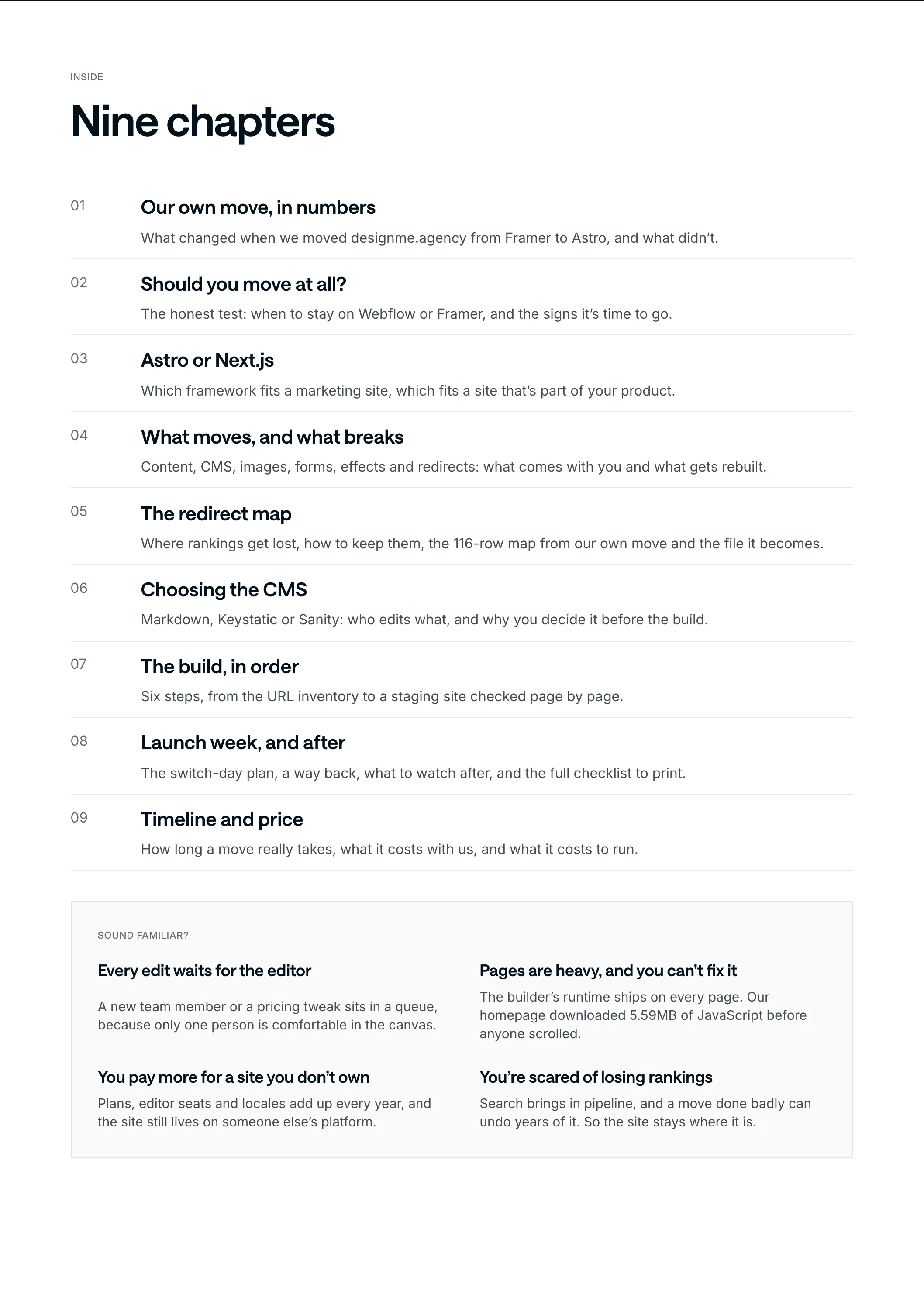
Our own move, in numbers
We ran designme.agency on Framer for three years. In October 2026 we moved it to Astro: first commit on 7 October, live on 13 October.
Six days.
- 91 to 99
- mobile PageSpeed Performance on Astro, from 33 to 71 on Framer
- $0
- a month to host on Cloudflare, from about $150 on Framer
- 15 min
- at most for a typical page edit with Claude, from 3 to 5 hours
- 91
- changes merged in the six days after the switch
Our homepage, before and after Astro
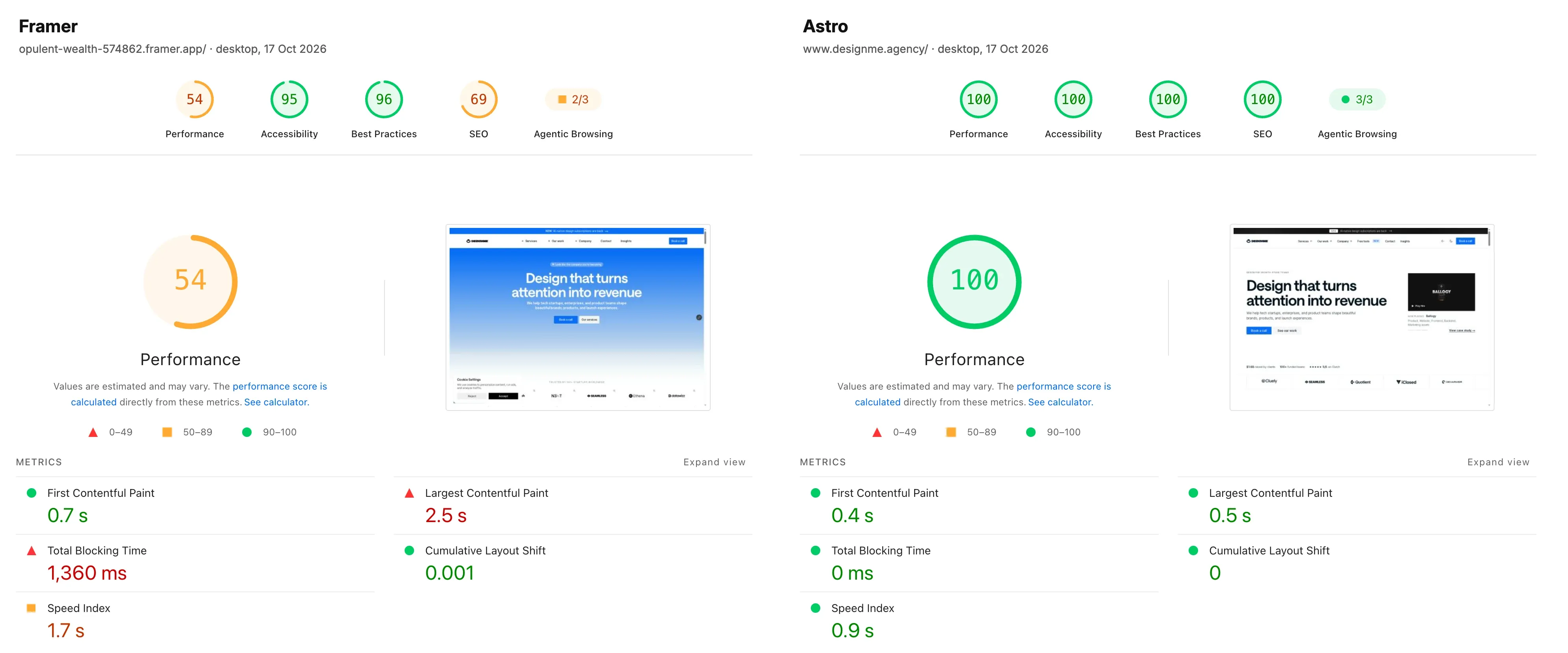
Framer vs Astro, PageSpeed desktopdesignme.agency
Here’s what changed on the homepage, measured with PageSpeed Insights on 17 October 2026 (desktop, the median of 3 runs on each site). One dot is one unit: grey is Framer, white is Astro.
Same homepage, before and after
63
live URLs inventoried and kept
1,378
files moved off the old CDN
5
CMS collections exported
91
changes in six days on Astro
Not everything improved, and you should know that before you move: the homepage’s mobile LCP stayed at 2.9 seconds on both sites. A new framework doesn’t fix the largest image on the page for you.
And the part I care about most: most of those 91 changes started as one sentence to Claude.
Chapter 02
Should you move at all?
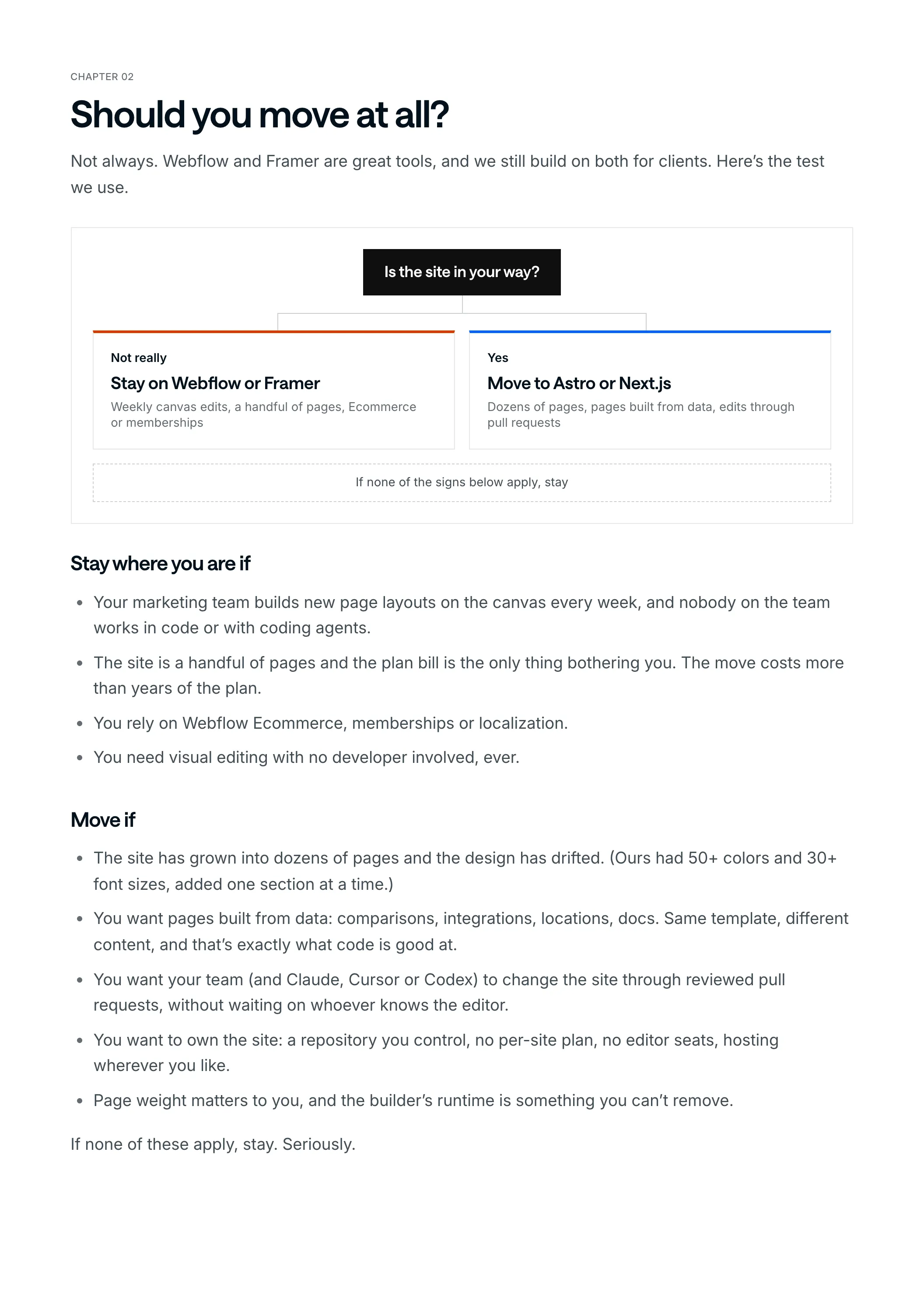
Not always. Webflow and Framer are great tools, and we still build on both for clients. Here’s the test we use.
Is the site in your way?
Not really
Stay on Webflow or Framer
Weekly canvas edits, a handful of pages, Ecommerce or memberships
Yes
Move to Astro or Next.js
Dozens of pages, pages built from data, edits through pull requests
If none of the signs below apply, stay
Stay where you are if
- Your marketing team builds new page layouts on the canvas every week, and nobody on the team works in code or with coding agents.
- The site is a handful of pages and the plan bill is the only thing bothering you. The move costs more than years of the plan.
- You rely on Webflow Ecommerce, memberships or localization.
- You need visual editing with no developer involved, ever.
Move if
- The site has grown into dozens of pages and the design has drifted. (Ours had 50+ colors and 30+ font sizes, added one section at a time.)
- You want pages built from data: comparisons, integrations, locations, docs. Same template, different content, and that’s exactly what code is good at.
- You want your team (and Claude, Cursor or Codex) to change the site through reviewed pull requests, without waiting on whoever knows the editor.
- You want to own the site: a repository you control, no per-site plan, no editor seats, hosting wherever you like.
- Page weight matters to you, and the builder’s runtime is something you can’t remove.
If none of these apply, stay. Seriously.
Chapter 03
Astro or Next.js
Both are good. They’re built for different jobs.
The two frameworks
Pick Astro when most pages are the same for every visitor: a marketing site, a blog, docs, programmatic pages. Astro renders pages to HTML and ships no JavaScript unless a component asks for it. That’s why we picked it for our own site.
Pick Next.js when the site behaves like part of your product:
- It shares components, a design system or authentication with a React app.
- There are logged-in areas, account pages or gated content.
- Pages are personalised per visitor, or generated per request from a database.
- Your engineers already ship Next.js every day and will own the site.
Astro and Next.js for a marketing site
| Astro | Next.js | |
|---|---|---|
| How pages build | HTML and CSS, JavaScript only in islands | React end to end, static and dynamic parts mixed |
| Publishing from a CMS | A rebuild that takes a minute or two | Changes can appear without a rebuild |
| Hosting | Static files on any host | Fits Vercel best, runs elsewhere |
| Server code to patch | Very little on a static site | More on a server-rendered site |
Some teams run both. Everything else in this guide works for either.
Running both
Astro
The main domain
Marketing, blog and docs
Next.js
The app subdomain
The product
Both share design tokens, so visitors see one company
Chapter 04
What moves, and what breaks
Here’s the part nobody tells you upfront: neither platform gives you a site you can build on. Framer has no HTML export at all. Webflow’s code export gives you HTML and CSS, but CMS lists come out empty, forms lose their backend and only the primary locale is included.
So the move is a rebuild, not a conversion. The content comes with you. The layout doesn’t.
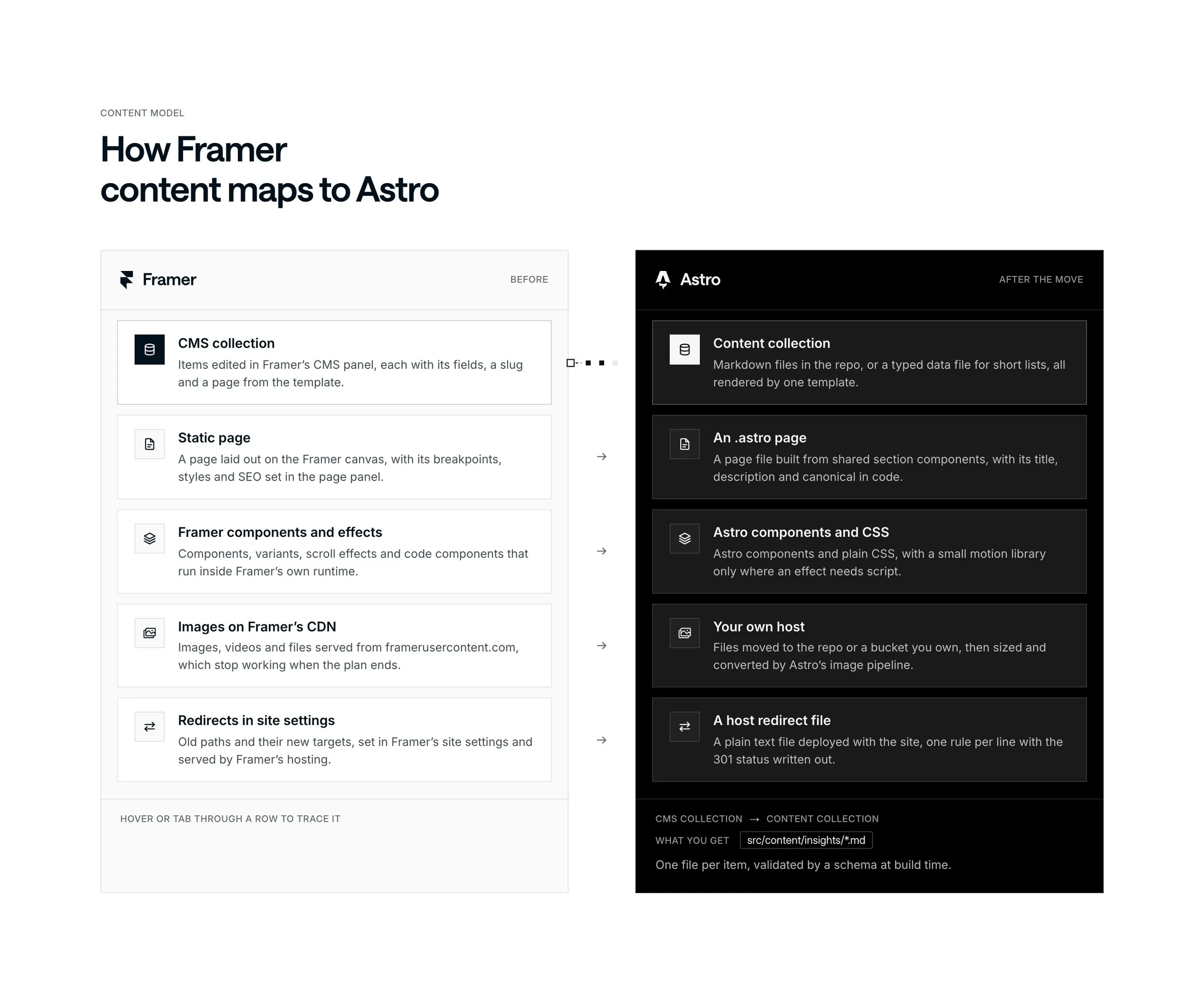
Content mapdesignme.agency
| Part of the site | From Webflow | From Framer | On Astro or Next.js |
|---|---|---|---|
| CMS content | Each collection exports to CSV (or comes out through the Data API), rich text as HTML | Each collection exports to CSV with Framer’s CMS Export plugin | Markdown or typed data files, checked against a schema at build time |
| Page copy | Saved from the live pages | Saved from the live pages | Copied word for word from the saved HTML, nothing retyped from memory |
| Images and files | On Webflow’s hosting, linked from the CSV | On framerusercontent.com | Downloaded and served from your own host |
| Pages and components | Rebuilt | Rebuilt | Rebuilt on a design system with tokens |
| Interactions and effects | Rebuilt | Rebuilt | CSS or a small motion library, shipped only where used |
| Forms | Lose their backend | Need a new home | A form service, your CRM or a serverless function |
| Redirects | Exported as CSV | Copied out of site settings | Real 301s in the host’s redirect file |
What breaks quietly
- Images on the old CDN. They still load on launch day, then stop working when you cancel the plan. Search the built site for Webflow and framerusercontent.com URLs before launch. We moved 1,378 files off Framer’s CDN.
- Pages missing from the sitemap. Our own Framer sitemap was missing a page the navigation linked to. Crawl the site as well as reading the sitemap.
- Trailing slashes. Framer serves URLs without one. The new config has to match, or every URL quietly changes.
- Redirects that aren’t 301s. On a static Astro build, redirects in the Astro config become meta refresh pages, and Cloudflare Pages uses 302 unless you write 301.
- Editing. The marketer who published on a Friday afternoon can’t any more, unless you decided who edits what before the build (chapter 6).
Chapter 05
The redirect map
The redirect map is the part most migrations get wrong, so start there, before anyone designs anything.
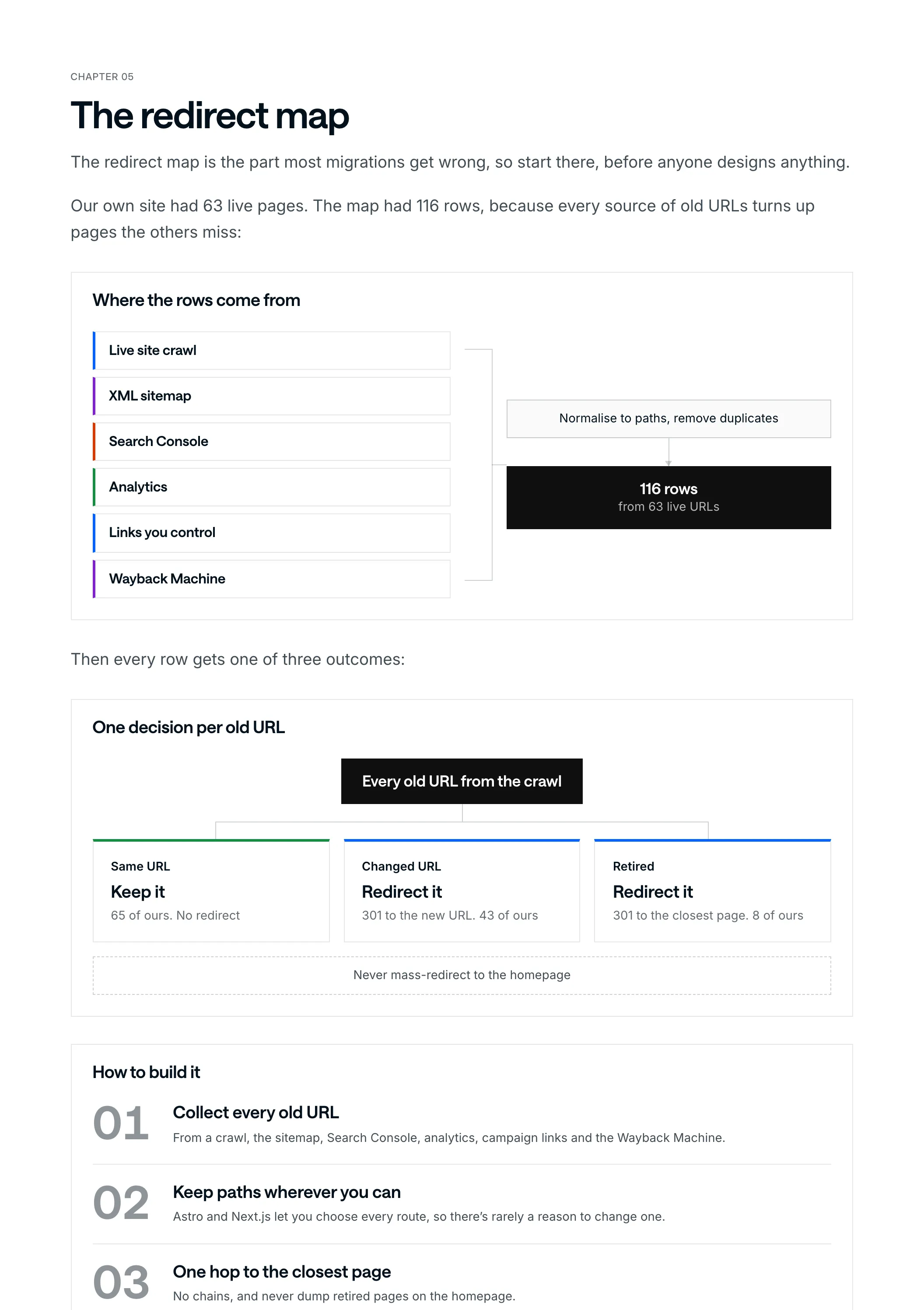
Our own site had 63 live pages. The map had 116 rows, because every source of old URLs turns up pages the others miss:
Where the rows come from
- Live site crawl
- XML sitemap
- Search Console
- Analytics
- Links you control
- Wayback Machine
Normalise to paths, remove duplicates
116 rowsfrom 63 live URLs
Then every row gets one of three outcomes:
One decision per old URL
Every old URL from the crawl
Same URL
Keep it
65 of ours. No redirect
Changed URL
Redirect it
301 to the new URL. 43 of ours
Retired
Redirect it
301 to the closest page. 8 of ours
Never mass-redirect to the homepage
How to build it
Collect every old URL
From a crawl, the sitemap, Search Console, analytics, campaign links and the Wayback Machine.
Keep paths wherever you can
Astro and Next.js let you choose every route, so there’s rarely a reason to change one.
One hop to the closest page
No chains, and never dump retired pages on the homepage.
Write the host’s format
And check its default status code: Cloudflare Pages uses 302 unless you write 301.
Test, then watch
Every row before launch, 404s daily after it. Keep the redirects for at least a year.
The first week of 404 reports turned up a few more old links, and our map is now 124 rows. Every page that earned links or rankings still has a working address.
What the file looks like
On Cloudflare Pages, where designme.agency runs, the map is a plain text file called _redirects in the build: old path, new path, status code, one row per line. Four rows from ours, the last one a retired page sent to the closest page:
# old path          new path                 status
/call               /intro                   301
/about              /about-us                301
/privacy-policy     /legal/privacy-policy    301
/projects/recruitu  /projects                301
Write the 301. Leave it off and Cloudflare Pages sends a 302, which tells Google the move is temporary.
On Next.js the same rows go in next.config.js. permanent: true sends a 308, which Google treats like a 301:
module.exports = {
  async redirects() {
    return [
      { source: '/call', destination: '/intro', permanent: true },
      { source: '/about', destination: '/about-us', permanent: true },
    ];
  },
};
Keep the map itself in a spreadsheet (old URL, new URL, outcome) and generate the file from it. Ours lives in the repository as a CSV, and a script writes _redirects from it, so nobody edits the file by hand.
Chapter 06
Choosing the CMS
Decide who edits what before the build, not after. It changes the build.
Three ways to edit the new site
Who changes the site after launch?
Markdown and data files
Developers
And AI agents, through reviewed pull requests. No visual editor, so a typo is a request
Keystatic
Your team
In a form on top of the same files. Good for titles, descriptions and simple fields
Sanity
Marketers
In Sanity Studio on your own domain, publishing weekly without a developer. Its own plans to price
Here’s what we run: insights are Markdown files in the repository, the rest is typed data, and Keystatic covers page titles and descriptions. Everything else changes by asking Claude, and nothing goes live until a person approves the preview.
If your marketers want to publish a post on their own on a Friday afternoon, give them a CMS. Both Astro and Next.js work well with Sanity. (On a static Astro site, a publish triggers a rebuild that takes a minute or two.)
Chapter 07
The build, in order
This is the order we used on designme.agency, and the order we use for clients.
From inventory to staging
- Before any code
Inventory every URL
Give each one a route in the new project before a line of code.
- Before any code
Save the source
The raw HTML of every page, every CMS collection as CSV, every asset mapped from its old URL to a local file.
- Build
Design system first
The builder’s values become tokens (type, color, spacing, light and dark), then shared sections. Pages are assembled from those.
- Build
Parity, then improvements
The first version matches the live site page for page: same copy, same SEO. Changes come after sign-off.
- Before launch
SEO on every page
Titles, descriptions, canonicals, OG images and structured data, plus a sitemap with only indexable pages.
- Before launch
Staging, side by side
The full site on a private address, compared with the old one page by page.
Parity first is the rule people want to skip. Don’t. If traffic moves after launch, you’ll know it wasn’t the copy.
Chapter 08
Launch week, and after
Launch early in the week, so someone is around when Google starts re-crawling.
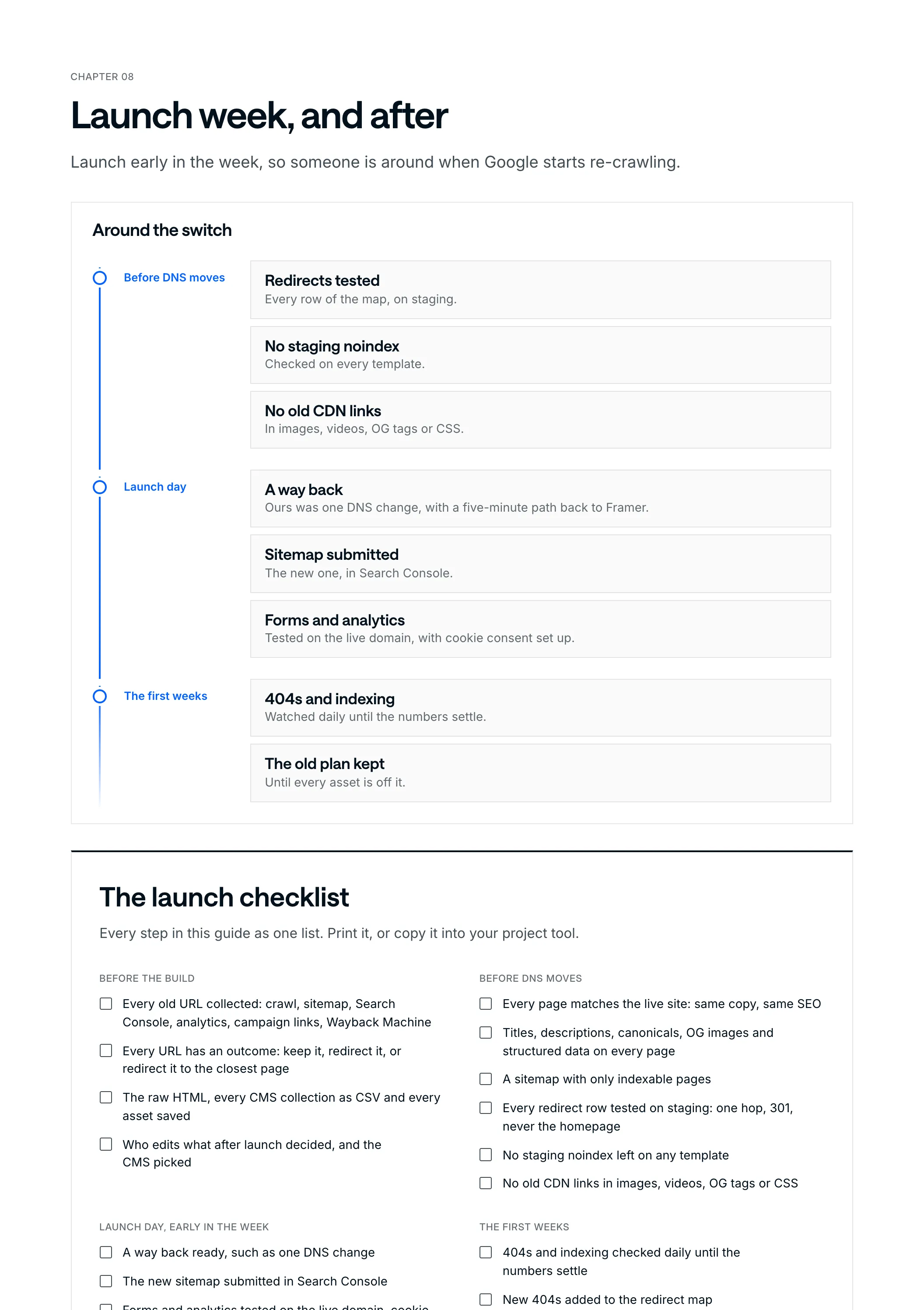
Around the switch
Before DNS moves
Redirects tested
Every row of the map, on staging.
No staging noindex
Checked on every template.
No old CDN links
In images, videos, OG tags or CSS.
Launch day
A way back
Ours was one DNS change, with a five-minute path back to Framer.
Sitemap submitted
The new one, in Search Console.
Forms and analytics
Tested on the live domain, with cookie consent set up.
The first weeks
404s and indexing
Watched daily until the numbers settle.
The old plan kept
Until every asset is off it.
The launch checklist
Every step in this guide as one list. Print it, or copy it into your project tool.
Before the build
- Every old URL collected: crawl, sitemap, Search Console, analytics, campaign links, Wayback Machine
- Every URL has an outcome: keep it, redirect it, or redirect it to the closest page
- The raw HTML, every CMS collection as CSV and every asset saved
- Who edits what after launch decided, and the CMS picked
Before DNS moves
- Every page matches the live site: same copy, same SEO
- Titles, descriptions, canonicals, OG images and structured data on every page
- A sitemap with only indexable pages
- Every redirect row tested on staging: one hop, 301, never the homepage
- No staging noindex left on any template
- No old CDN links in images, videos, OG tags or CSS
Launch day, early in the week
- A way back ready, such as one DNS change
- The new sitemap submitted in Search Console
- Forms and analytics tested on the live domain, cookie consent set up
The first weeks
- 404s and indexing checked daily until the numbers settle
- New 404s added to the redirect map
- The old plan kept until every asset is off it
- Redirects kept for at least a year
Chapter 09
Timeline and price
Our own move took six days. That was our site, our team, no sign-off rounds and Claude doing a lot of the typing. For a client site, we plan 4 to 5 weeks for most sites, from the URL inventory to launch. Heavy integrations, lots of custom effects or a big CMS take longer.
- 4 to 5 weeks
- for most sites, from the URL inventory to launch
- $10,000
- the starting fixed price for a landing page sized site
- $15,000
- the starting fixed price for a full site or a headless CMS build
You get the scope and the price on a call, before anything starts, and the platform you pick doesn’t change it.
Running costs usually drop. A mostly static Astro site costs little or nothing to host for most marketing sites, and there are no editor seats for the site itself. A CMS like Sanity has its own plans, so price it for your team.
Want a number for your site? Book a 30-minute call and bring your URL. You’ll leave knowing which stack fits, roughly how long it takes and what it costs. And if the honest answer is “stay on Webflow” (or Framer), I’ll tell you that too.