Let your team edit your website with Claude
By Adrian Kuleszo, Co-founder, DesignMe. Updated 12 November 2026.
Download the PDF (12 pages)Chapter 01
What it looks like day to day
Here’s the whole idea in one example. The sales team needs a landing page for a trade show. The marketing lead asks Claude for it: “use the event page layout, add the booth number, a form and three product photos.”
Twenty minutes later there’s a preview link. They ask for the form above the photos, approve the second version, and it goes live after review. Nobody opened a code editor.
From request to live page
Request
Someone asks Claude in plain words, in Slack or on GitHub.
Claude edits files
On a branch of its own, following the rules in CLAUDE.md.
Preview
The host builds a preview link, and the checks run.
Review
A person checks the preview, asks for changes and approves.
Live
Only the approved change merges and goes to production.
What it changed on our own site
We moved designme.agency from Framer to Astro in October 2026, and changed it this way from day one. In the six days after the switch, 91 changes were merged: a new team member on the About page, a shorter contact form, faster videos, small copy fixes. Most of them started as one sentence to Claude.
- 15 min
- at most for a major page update with Claude, from 3 to 5 hours on Framer
- 91
- changes merged in the six days after the switch
- 954
- of 1,155 commits on our main branch list Claude as a co-author
- $0
- a month to host, from about $150 with 5 Framer editors
That doesn’t mean Claude runs the site. Every one of those commits started with a person’s request, and nothing reaches production without my OK. It shows where the typing happens.
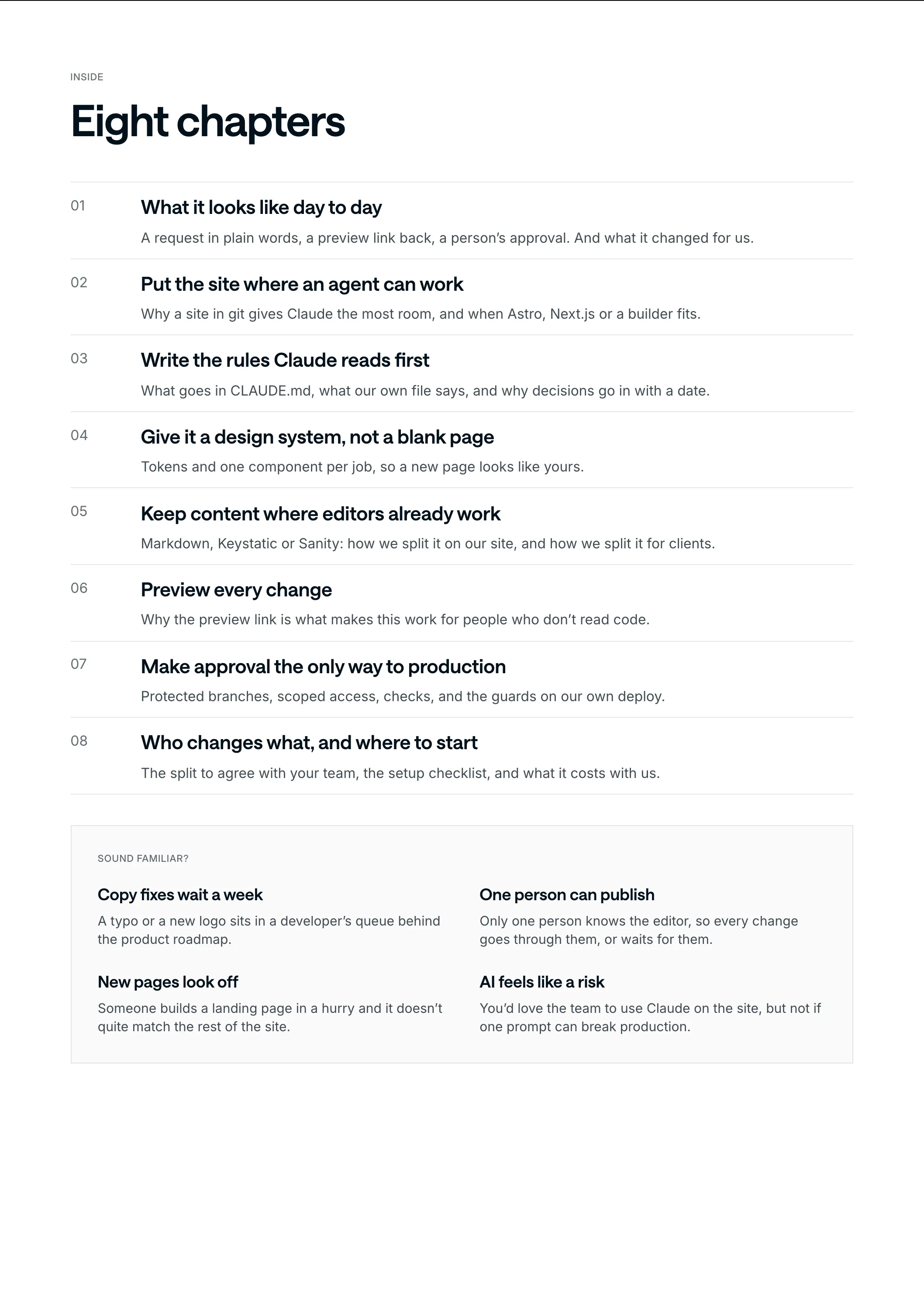
Chapter 02
Put the site where an agent can work
An agent works best on plain files in a git repository: components, styles and content it can read, change and build. That’s why code-based sites give it the most room.
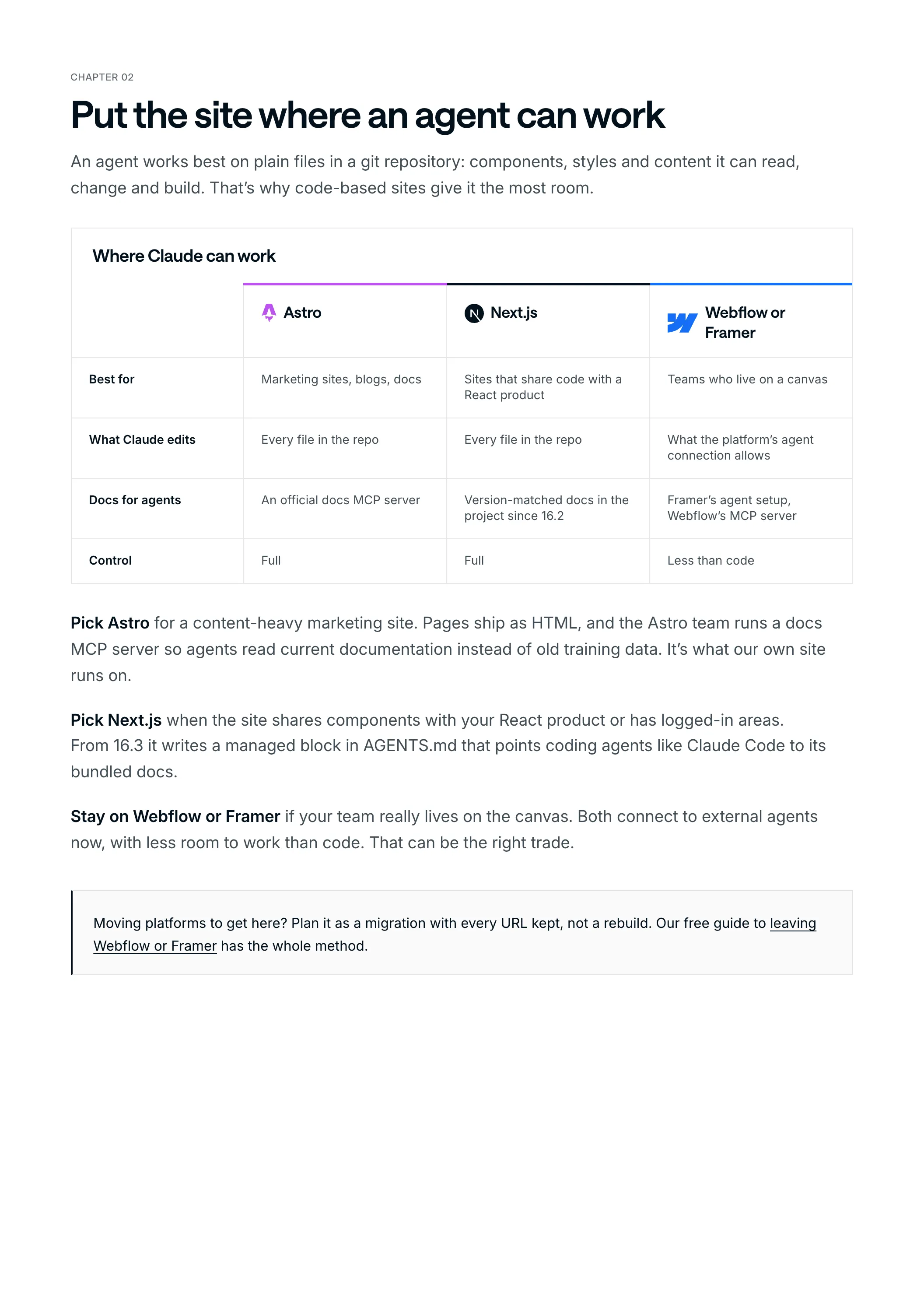
Where Claude can work
| Astro | Next.js | Webflow or Framer | |
|---|---|---|---|
| Best for | Marketing sites, blogs, docs | Sites that share code with a React product | Teams who live on a canvas |
| What Claude edits | Every file in the repo | Every file in the repo | What the platform’s agent connection allows |
| Docs for agents | An official docs MCP server | Version-matched docs in the project since 16.2 | Framer’s agent setup, Webflow’s MCP server |
| Control | Full | Full | Less than code |
Pick Astro for a content-heavy marketing site. Pages ship as HTML, and the Astro team runs a docs MCP server so agents read current documentation instead of old training data. It’s what our own site runs on.
Pick Next.js when the site shares components with your React product or has logged-in areas. From 16.3 it writes a managed block in AGENTS.md that points coding agents like Claude Code to its bundled docs.
Stay on Webflow or Framer if your team really lives on the canvas. Both connect to external agents now, with less room to work than code. That can be the right trade.
Chapter 03
Write the rules Claude reads first
Claude Code reads a CLAUDE.md file in the project at the start of every session, and your team shares it through git. Other agents read AGENTS.md, and Claude Code can read that too. This is where your site’s rules live.
Ours is about a hundred lines, in short sections. Each one answers a question Claude would otherwise guess at (and guessing is where off-brand pages come from):
| Section | What it settles | A real rule from it |
|---|---|---|
| Stack | Where things live | Insights are a Markdown collection; case studies are one Astro page each |
| Design system | Which values to use | Use semantic tokens, never a hard-coded hex value or px font size |
| Components | Which building block fits | A card is `Card` inside a `CardGrid`; a big number is `Stat` |
| Rules that don’t bend | What never changes quietly | No slug rename without a 301 in the redirects file |
| SEO | What every page must carry | Titles at most 60 characters, descriptions 120 to 160 |
| Cookie consent | What never gets added to a page | No tracking script added directly; it goes in Tag Manager with a consent check |
Keep it short and point elsewhere for detail. Our design system has its own document, and so do the deploy and the content editor.
Write decisions down, with a date
Here’s the habit that matters most. When someone makes a call (“no visual breadcrumbs at the top of pages”), it goes into the file with the date, the same day. Several of ours carry a date like that. Once it’s written down, every later change follows it, whoever asks, and nobody has to repeat it in a review.
Chapter 04
Give it a design system, not a blank page
Ask an agent for a pricing page on a site without a design system and you get a generic pricing page. Ask it on a site with tokens, approved sections and written rules, and you get a page that looks like yours.
Ours has two layers:
- Tokens in one CSS file. Colours written once for light and dark, a fluid type scale, spacing and radius.
- A small set of primitives.
Cardfor any tile,Listfor rows,Tagfor every chip and filter,Statfor big numbers,SectionHeadfor headings. All of them on a styleguide page, in both themes, so a reviewer can compare.
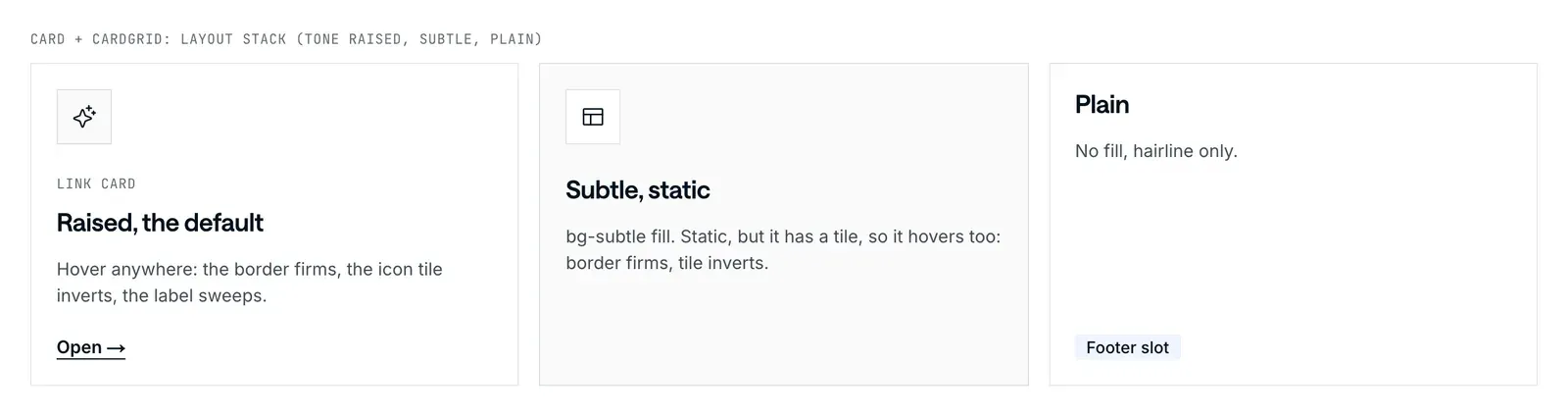
Card tonesdesignme.agency
The rule we lean on most is the plainest: no new card, list or chip styles. If a primitive can’t do what a page needs, Claude adds a variant to it. It came straight from my feedback when we built the library: “We don’t want to have 50 different styles for cards or 50 different styles for lists.”
Chapter 05
Keep content where editors already work
Decide who edits what before the build, not after. Then the agent can work in all of it.
What we use: Keystatic
Our site is small and few people edit it, so we didn’t put a hosted CMS in front of it. Content lives as files in the repo. For the thing non-developers change most (each page’s title and meta description) we added Keystatic, an open-source editor that saves straight into the repo’s files.
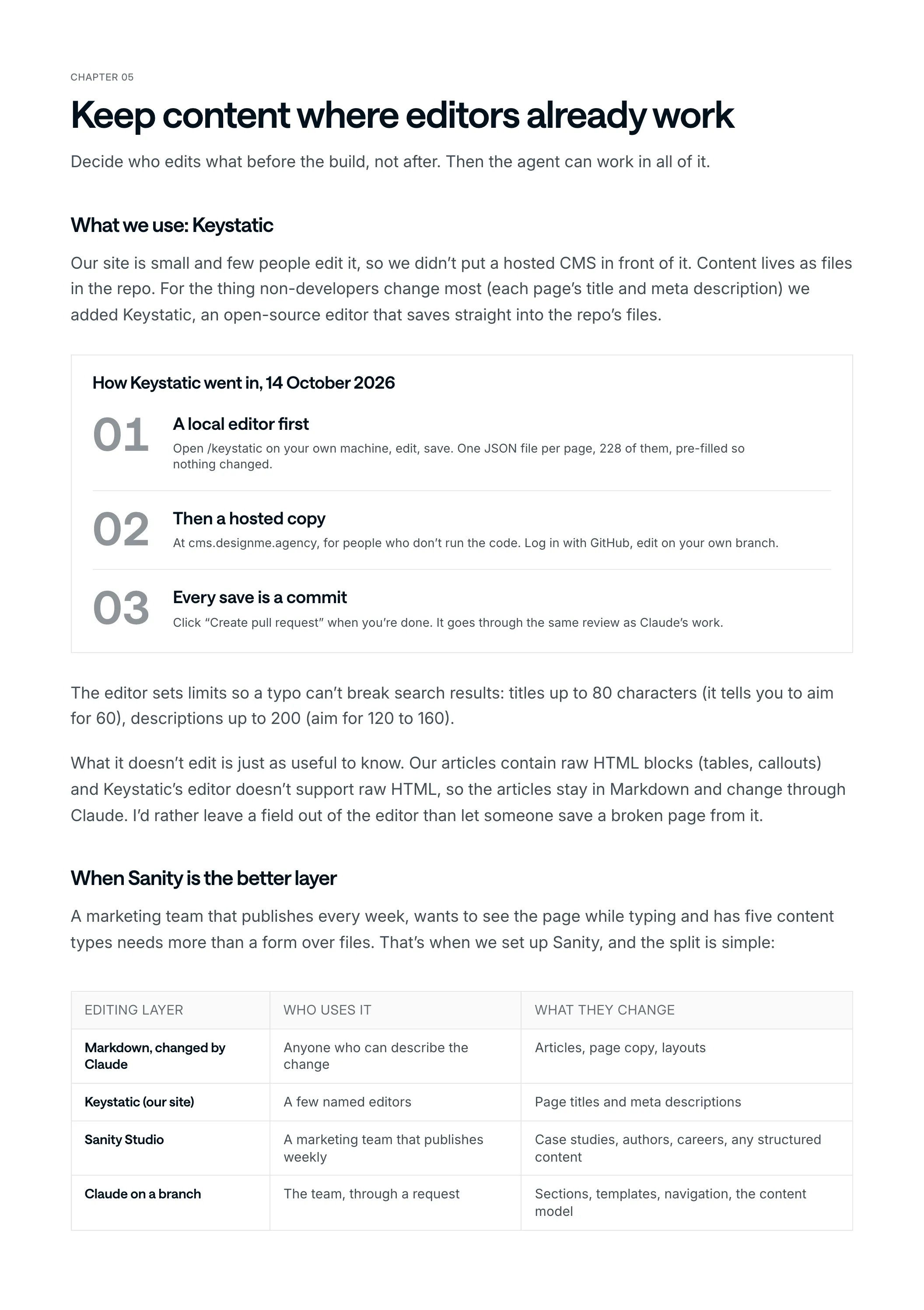
How Keystatic went in, 14 October 2026
A local editor first
Open /keystatic on your own machine, edit, save. One JSON file per page, 228 of them, pre-filled so nothing changed.
Then a hosted copy
At cms.designme.agency, for people who don’t run the code. Log in with GitHub, edit on your own branch.
Every save is a commit
Click “Create pull request” when you’re done. It goes through the same review as Claude’s work.
The editor sets limits so a typo can’t break search results: titles up to 80 characters (it tells you to aim for 60), descriptions up to 200 (aim for 120 to 160).
What it doesn’t edit is just as useful to know. Our articles contain raw HTML blocks (tables, callouts) and Keystatic’s editor doesn’t support raw HTML, so the articles stay in Markdown and change through Claude. I’d rather leave a field out of the editor than let someone save a broken page from it.
When Sanity is the better layer
A marketing team that publishes every week, wants to see the page while typing and has five content types needs more than a form over files. That’s when we set up Sanity, and the split is simple:
| Editing layer | Who uses it | What they change |
|---|---|---|
| Markdown, changed by Claude | Anyone who can describe the change | Articles, page copy, layouts |
| Keystatic (our site) | A few named editors | Page titles and meta descriptions |
| Sanity Studio | A marketing team that publishes weekly | Case studies, authors, careers, any structured content |
| Claude on a branch | The team, through a request | Sections, templates, navigation, the content model |
Chapter 06
Preview every change
Every change should come with a link to the site as it’ll look. The common hosts do this by default: Vercel builds a preview for every pull request, Netlify builds a Deploy Preview, and Cloudflare Pages gives every pull request its own preview URL.
The preview is what makes the workflow usable for people who don’t read code. The marketing lead opens the page on their phone, asks for changes in the same thread, and approves when it’s right.
How ours run
Our previews run on Cloudflare. A script in the repo takes the branch Claude worked on and builds it in a clean copy of the repository (never the folder someone is editing in). It marks every page noindex, so search engines don’t pick it up, and deploys it to a private address. The real domain is untouched.
Anyone reviewing gets a link that looks and behaves like the live site, apart from the contact forms, which only run in production.
Chapter 07
Make approval the only way to production
The agent drafts, a person approves, and only the approval publishes. That’s the rule that makes the rest safe.
- Protect the main branch. GitHub can require approving reviews before anything merges, and the agent’s work never skips that.
- Scope access. Give the agent the repository and CMS it needs, with separate rights to draft, publish and approve. Anthropic’s docs say the same: only the permissions it needs, and review Claude’s changes before merging.
- Add automated checks. Build, broken links, accessibility and page weight on every pull request, so the reviewer looks at the page, not the plumbing.
- Watch untrusted input. Text inside content can try to redirect an agent (prompt injection). Keep agents in trusted channels and repositories.
The guards on our own site
- The deploy script refuses to run unless the code is exactly what’s on the main branch on GitHub.
- Run by hand, it asks you to type the project’s name before it continues.
- Nothing deploys on its own. Merging into main doesn’t publish; production only updates when I run the deploy.
- If a bad deploy slips through anyway, rolling back is one click in the Cloudflare dashboard.
Why review stays
Because the output isn’t always right. In Stack Overflow’s 2025 Developer Survey, 84% of developers use or plan to use AI tools, and more of them distrust their accuracy than trust it.
- 84%
- of developers use or plan to use AI tools
- 46%
- distrust the accuracy of those tools
- 33%
- trust it
The first drafts are fast. The review is where the time goes, and it’s where the quality comes from.
Chapter 08
Who changes what, and where to start
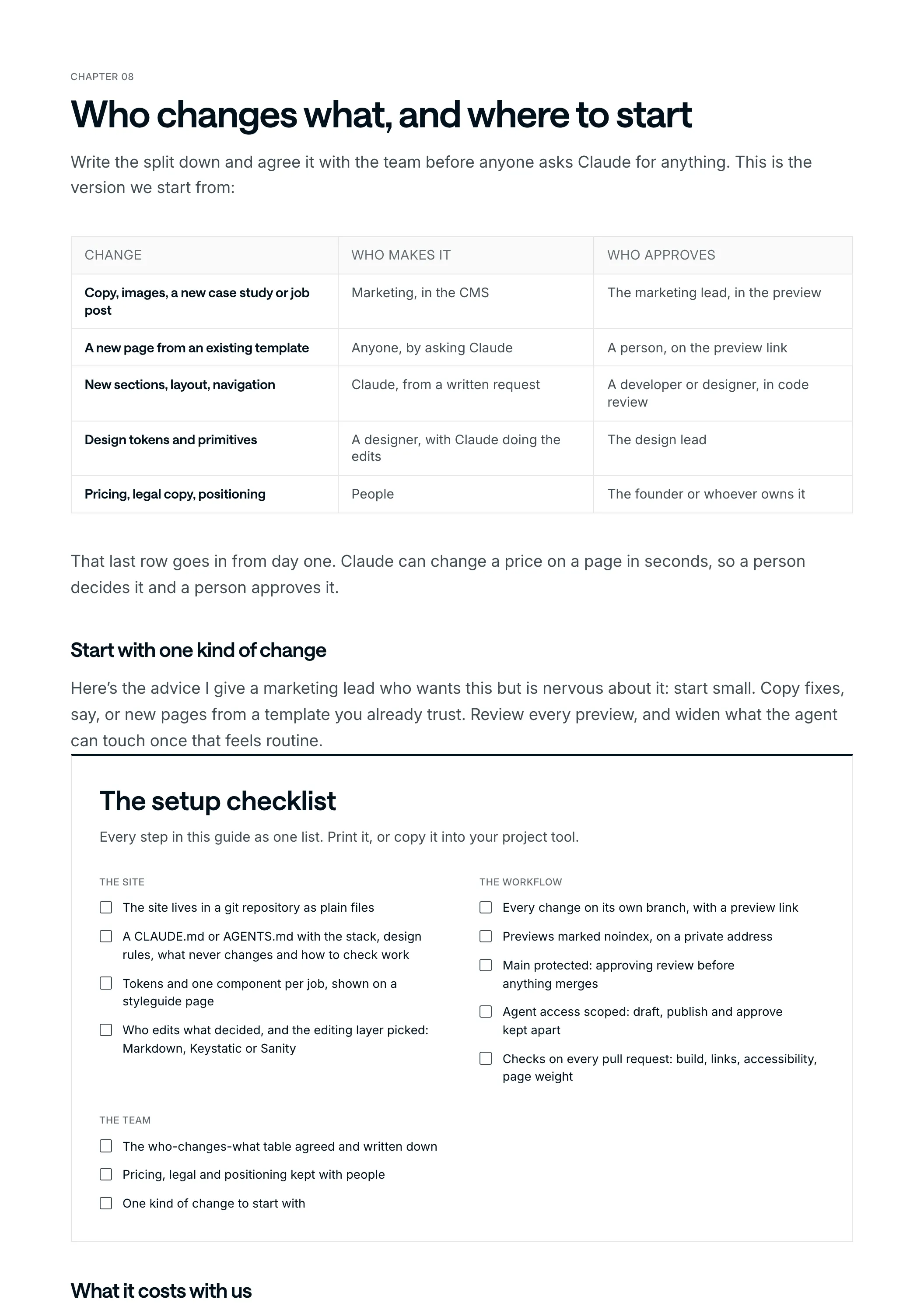
Write the split down and agree it with the team before anyone asks Claude for anything. This is the version we start from:
| Change | Who makes it | Who approves |
|---|---|---|
| Copy, images, a new case study or job post | Marketing, in the CMS | The marketing lead, in the preview |
| A new page from an existing template | Anyone, by asking Claude | A person, on the preview link |
| New sections, layout, navigation | Claude, from a written request | A developer or designer, in code review |
| Design tokens and primitives | A designer, with Claude doing the edits | The design lead |
| Pricing, legal copy, positioning | People | The founder or whoever owns it |
That last row goes in from day one. Claude can change a price on a page in seconds, so a person decides it and a person approves it.
Start with one kind of change
Here’s the advice I give a marketing lead who wants this but is nervous about it: start small. Copy fixes, say, or new pages from a template you already trust. Review every preview, and widen what the agent can touch once that feels routine.
The setup checklist
Every step in this guide as one list. Print it, or copy it into your project tool.
The site
- The site lives in a git repository as plain files
- A CLAUDE.md or AGENTS.md with the stack, design rules, what never changes and how to check work
- Tokens and one component per job, shown on a styleguide page
- Who edits what decided, and the editing layer picked: Markdown, Keystatic or Sanity
The workflow
- Every change on its own branch, with a preview link
- Previews marked noindex, on a private address
- Main protected: approving review before anything merges
- Agent access scoped: draft, publish and approve kept apart
- Checks on every pull request: build, links, accessibility, page weight
The team
- The who-changes-what table agreed and written down
- Pricing, legal and positioning kept with people
- One kind of change to start with
What it costs with us
Two parts: a site built for it, and the workflow around it. Our headless CMS and custom builds start from $15,000 and take 4+ weeks, with the team and agent docs included. On a site that’s already ready, setting up the AI workflow (an agent your team asks in Slack or Claude, with approval before publish) takes 3 to 4 weeks.
Want to know what it’d take for your site? Book a 30-minute call and bring the URL.